


Agent Capabilities
Agent capabilities are optional extensions that expand what an agent can do during a conversation. They are designed to be opt-in: by default, agents operate in a focused mode without extended permissions, and you activate capabilities only when a specific task calls for them.
Capabilities Overview
A capability is a bundle of additional tools and permissions that an agent can use when the user enables it. Capabilities allow agents to do things they cannot do by default, such as running shell commands or interacting with GitHub.
This design keeps agents predictable and contained in everyday use, while still giving you access to more powerful behaviors when you need them.
Capability Chips in the Chat Input
Agents that advertise optional capabilities show compact toggle chips directly in the chat input area. Each chip represents a named capability, usually off by default - click the chip to enable it for your next request, click again to disable. When any capability is on, a small blue dot appears on the tools icon in the chat toolbar so you can see at a glance that a capability is active.
@Coder advertises three chips in Agent Mode:
- Shell Execution - grants @Coder access to the
shellExecutetool, allowing it to run shell commands on the host (the Fabric Dev server). The agent still prefers workspace tasks and dedicated file tools and falls back to shell execution only when no better option exists. - GitHub - lets @Coder delegate to the @GitHub agent during a task, so it can read issues, create pull requests, query repositories, and perform other Git operations as part of the implementation workflow.
- AppTester - delegates to the AppTester agent after an implementation step to run UI verification, forming an implement-and-test loop without extra prompting.
@k2-assistant advertises three chips:
See Ask, Plan and Act Modes and Memory below.
These chips, and the agent's default for each of them, are also listed under Available Capabilities on the agent's page in AI Configuration (Agents category > open the agent). For Anthropic models the same page lists Server Tools (Web Fetch, Web Search), off by default - see Security and Privacy.
Other agents (including custom and plugin-provided agents) can declare their own chips - see Declaring Capabilities in an Agent Prompt below.
Memory
From V8.5.2, @k2-assistant supports the Memory capability, which is off by default. When you turn it on, the assistant keeps a wiki-style knowledge base in the workspace and reuses it in later tasks:
.agents/memory/raw/- append-only notes: session logs and findings, as recorded..agents/memory/wiki/- compiled articles, one concept each, linked from anindex.html.
The assistant turns what it learned in a session into linked concept articles, so later sessions do not have to rediscover the same facts about your project. The memory files are ordinary workspace files: you can read, edit or delete them, and decide whether to commit them to Git.
The Generic Capabilities Panel
Beyond the chat-input chips, Studio AI provides a Generic Capabilities Panel for fine-grained control over everything an agent can call into. The panel exposes not only the capability bundles surfaced as chips, but also individual skills, MCP server tools (grouped by server), built-in tool functions (grouped by provider), prompt fragments, agent delegation targets, and variables.
To open the panel:
- Click the tools icon in the chat toolbar, or
- Press Ctrl+Shift+. (or Cmd+Shift+. on Mac), or
- Use the command palette: F1 > Open Capabilities Panel.
The panel displays a searchable tree. Each entry shows its name, description, and current status; you can enable or disable individual items from here. MCP tools appear and disappear live as MCP servers connect or stop.
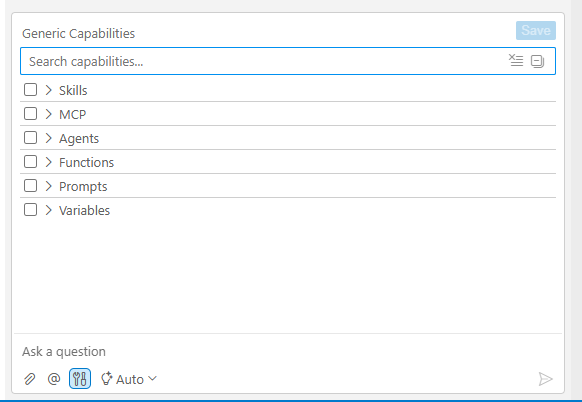
Use this panel when:
- You want to see everything that is available, not just the chips visible for the current agent
- You need to enable a capability for an agent that does not surface it as a chip
- You want to disable a tool or skill you previously enabled
- You want to make a selection persistent (see below)
Capability Persistence
Toggle chips and Generic Capabilities Panel selections are per session. When you start a new chat session, all capabilities reset to their defaults - off, except where the agent declares a capability as default on, such as Shell Execution in @k2-assistant's Act mode - so that permissions do not silently carry over from one task to the next.
Within the current session, once a capability is enabled it stays on for all subsequent messages until you explicitly disable it.
If you want a selection to survive across sessions, use the save icon in the Generic Capabilities Panel - it writes your current selection to your settings file so the same capabilities are pre-enabled on the next session.
Declaring Capabilities in an Agent Prompt
A capability becomes a chip on an agent when the agent's prompt template declares it. The declaration uses the syntax:
{{capability:<capability-name> default off}}
For example, the @Broadway-Flow-Builder agent in the Fabric Project AI Plugin declares {{capability:shell-execution default off}} so that a Shell Execution chip appears in the chat input when that agent is pinned.
You can add the same line to a custom agent's prompt template (see Creating Custom Agents and Agents Prompt Customization) to expose any registered capability as an opt-in chip. The default off clause is important: it ensures the capability remains opt-in even after the prompt is edited.
Agent Capabilities
Agent capabilities are optional extensions that expand what an agent can do during a conversation. They are designed to be opt-in: by default, agents operate in a focused mode without extended permissions, and you activate capabilities only when a specific task calls for them.
Capabilities Overview
A capability is a bundle of additional tools and permissions that an agent can use when the user enables it. Capabilities allow agents to do things they cannot do by default, such as running shell commands or interacting with GitHub.
This design keeps agents predictable and contained in everyday use, while still giving you access to more powerful behaviors when you need them.
Capability Chips in the Chat Input
Agents that advertise optional capabilities show compact toggle chips directly in the chat input area. Each chip represents a named capability, usually off by default - click the chip to enable it for your next request, click again to disable. When any capability is on, a small blue dot appears on the tools icon in the chat toolbar so you can see at a glance that a capability is active.
@Coder advertises three chips in Agent Mode:
- Shell Execution - grants @Coder access to the
shellExecutetool, allowing it to run shell commands on the host (the Fabric Dev server). The agent still prefers workspace tasks and dedicated file tools and falls back to shell execution only when no better option exists. - GitHub - lets @Coder delegate to the @GitHub agent during a task, so it can read issues, create pull requests, query repositories, and perform other Git operations as part of the implementation workflow.
- AppTester - delegates to the AppTester agent after an implementation step to run UI verification, forming an implement-and-test loop without extra prompting.
@k2-assistant advertises three chips:
See Ask, Plan and Act Modes and Memory below.
These chips, and the agent's default for each of them, are also listed under Available Capabilities on the agent's page in AI Configuration (Agents category > open the agent). For Anthropic models the same page lists Server Tools (Web Fetch, Web Search), off by default - see Security and Privacy.
Other agents (including custom and plugin-provided agents) can declare their own chips - see Declaring Capabilities in an Agent Prompt below.
Memory
From V8.5.2, @k2-assistant supports the Memory capability, which is off by default. When you turn it on, the assistant keeps a wiki-style knowledge base in the workspace and reuses it in later tasks:
.agents/memory/raw/- append-only notes: session logs and findings, as recorded..agents/memory/wiki/- compiled articles, one concept each, linked from anindex.html.
The assistant turns what it learned in a session into linked concept articles, so later sessions do not have to rediscover the same facts about your project. The memory files are ordinary workspace files: you can read, edit or delete them, and decide whether to commit them to Git.
The Generic Capabilities Panel
Beyond the chat-input chips, Studio AI provides a Generic Capabilities Panel for fine-grained control over everything an agent can call into. The panel exposes not only the capability bundles surfaced as chips, but also individual skills, MCP server tools (grouped by server), built-in tool functions (grouped by provider), prompt fragments, agent delegation targets, and variables.
To open the panel:
- Click the tools icon in the chat toolbar, or
- Press Ctrl+Shift+. (or Cmd+Shift+. on Mac), or
- Use the command palette: F1 > Open Capabilities Panel.
The panel displays a searchable tree. Each entry shows its name, description, and current status; you can enable or disable individual items from here. MCP tools appear and disappear live as MCP servers connect or stop.
Use this panel when:
- You want to see everything that is available, not just the chips visible for the current agent
- You need to enable a capability for an agent that does not surface it as a chip
- You want to disable a tool or skill you previously enabled
- You want to make a selection persistent (see below)
Capability Persistence
Toggle chips and Generic Capabilities Panel selections are per session. When you start a new chat session, all capabilities reset to their defaults - off, except where the agent declares a capability as default on, such as Shell Execution in @k2-assistant's Act mode - so that permissions do not silently carry over from one task to the next.
Within the current session, once a capability is enabled it stays on for all subsequent messages until you explicitly disable it.
If you want a selection to survive across sessions, use the save icon in the Generic Capabilities Panel - it writes your current selection to your settings file so the same capabilities are pre-enabled on the next session.
Declaring Capabilities in an Agent Prompt
A capability becomes a chip on an agent when the agent's prompt template declares it. The declaration uses the syntax:
{{capability:<capability-name> default off}}
For example, the @Broadway-Flow-Builder agent in the Fabric Project AI Plugin declares {{capability:shell-execution default off}} so that a Shell Execution chip appears in the chat input when that agent is pinned.
You can add the same line to a custom agent's prompt template (see Creating Custom Agents and Agents Prompt Customization) to expose any registered capability as an opt-in chip. The default off clause is important: it ensures the capability remains opt-in even after the prompt is edited.
