


Declarative Field Level Authorization with Instance-Level Access Control
Overview
The purpose of the Declarative Field-Level Authorization mechanism is to restrict access to sensitive data, using Role-Based Access Control (RBAC). Fabric can expose either the original or manipulated data to Fabric users based on their predefined roles. This mechanism applies to all channels that query Fabric data: Web Services, GraphIt and Broadway actors.
For example, the Customer Details web service retrieves an SSN, which is considered sensitive data. Most user roles are not permitted to view a customer's SSN, whereas some roles (such as administrators) are. The Declarative Field-Level Authorization mechanism allows to define a security profile that can redirect the web service to retrieve a masked SSN instead of the original one.
Beyond field-level masking, security profiles also support instance-level access control: When access is requested to a LU instnace, Fabric validates whether a user is authorized to view it based on the security profile, and defined root table view. It does so by checking if the active view returns any rows for the root table. If the view turns no rows, an unauthorized exception is thrown. It is up to the implementation to define the root table view according to the required privilage. The Search command, also uses this convention and returns only the IID when the user is unauthorized, and Web Service/GraphIt responses are similarly filtered according to security profile definitions.
For example, to restrict certain users from accessing VIP customers, you can add a vip_ind field to the root table and mark VIP customers with 'Y' (all other customers remain null). Then define a view called customers_vip with the query SELECT * FROM root_table WHERE vip_ind IS NULL. Users whose role is linked to a security profile containing this view will be blocked from accessing VIP customer instances — the sync activity will throw an unauthorized exception.
The following section describes how to set up the Declarative Field-Level Authorization mechanism.
End-to-End Definition of Field-Level Authorization
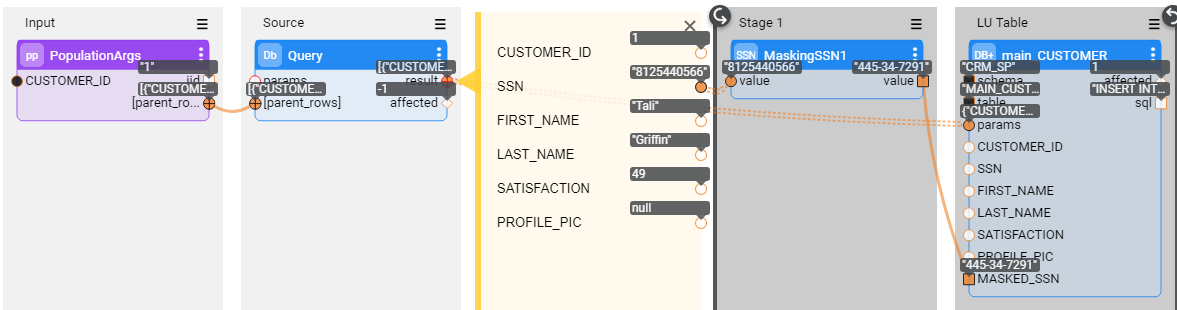
Apply data manipulation on a table that contains sensitive data. For example, you can add a new field called MASKED_SSN to the CUSTOMER LU table and populate it with a masked value of the original SSN field using the CUSTOMER population flow as illustrated below:
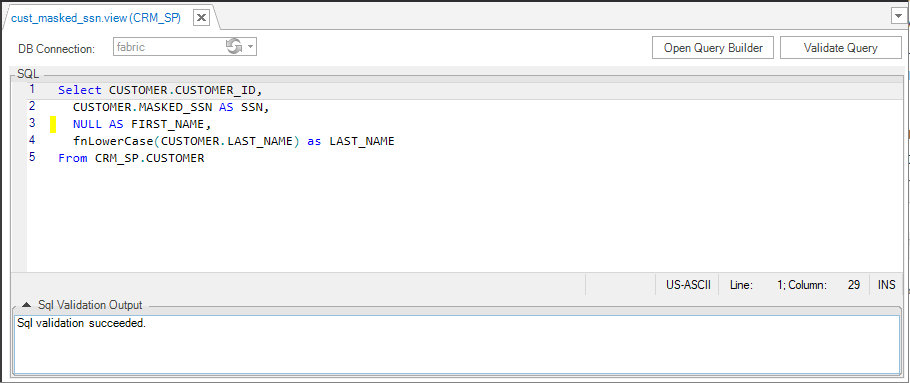
Create an LU view that retrieves the manipulated value instead of the original value. For example, using the following query, create an LU view that exposes the value of the MASKED_SSN field instead of the original SSN value. Data manipulation can also be done using an LUDB function.
- Note: The LU view must have the same number of columns as the original LU table, otherwise the Web Service or GraphIt that calls it will fail to replace the table with the view. However, should you wish to hide all values of a certain column, you could always use the
NULL AS <column name>syntax.
- Note: The LU view must have the same number of columns as the original LU table, otherwise the Web Service or GraphIt that calls it will fail to replace the table with the view. However, should you wish to hide all values of a certain column, you could always use the
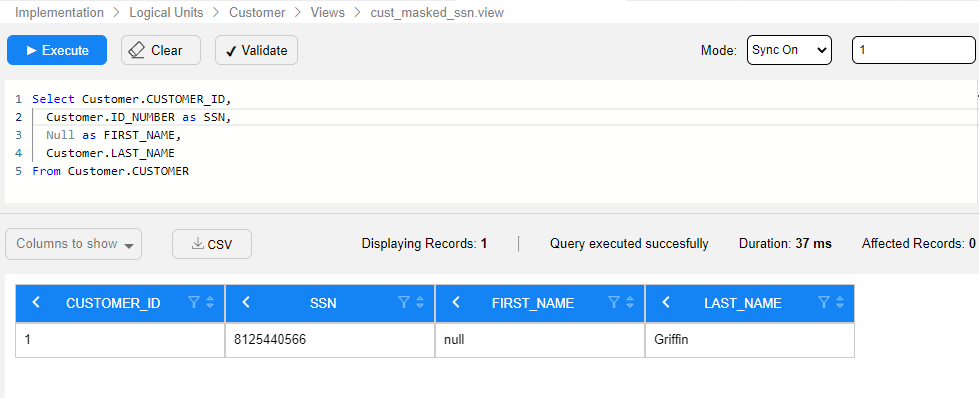
Click to get more information about LU views creation.
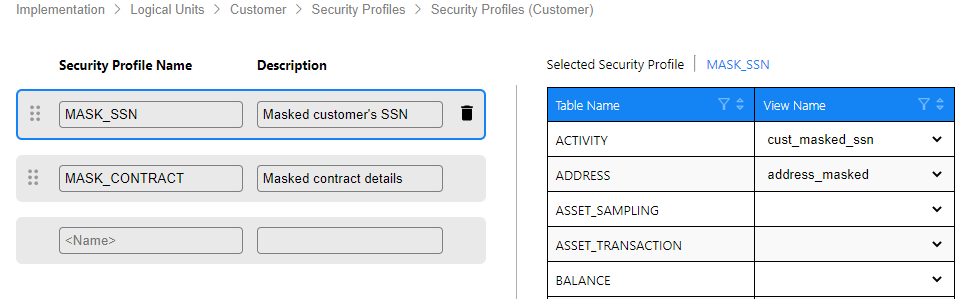
Create a security profile, then select an LU table and assign it with a corresponding LU view.
Each LU table can only be defined once under each security profile.
Each LU table can be assigned to more than one security profile.
Each LU view can be attached to more than one LU table.
To enforce instance-level access control, assign a root table view to the security profile. Users whose role is linked to this profile will be blocked from syncing unauthorized instances entirely, rather than only having fields masked.
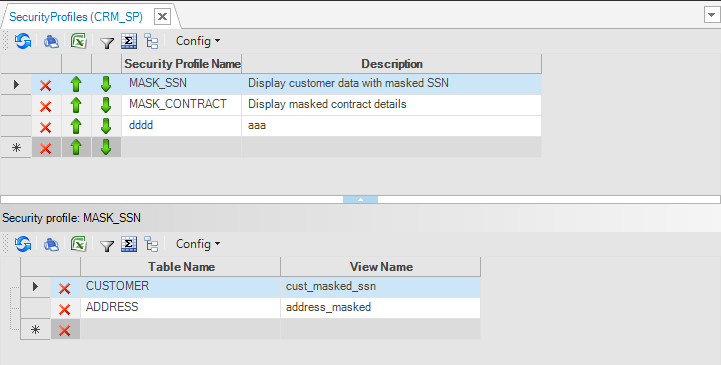
Click to get more information about the security profiles.
Save the security profile and deploy the LU.
Assign the created security profile to a user role by one of the following ways:
Using a Fabric command to assign a security profile to a role.
Opening the Web Admin > Security > Roles, as shown below:
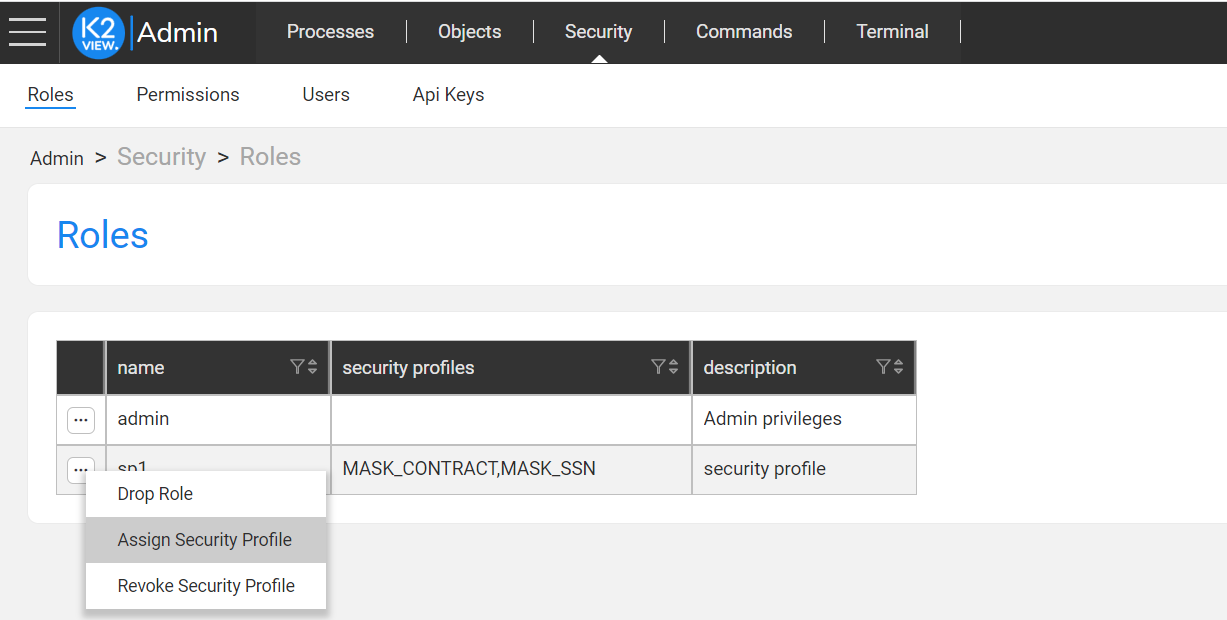
Multiple security profiles can be assigned to the same role.
Note: If the same LU table is defined under several security profiles assigned to the same role, Fabric will select the first security profile that appears in Studio.


Declarative Field Level Authorization with Instance-Level Access Control
Overview
The purpose of the Declarative Field-Level Authorization mechanism is to restrict access to sensitive data, using Role-Based Access Control (RBAC). Fabric can expose either the original or manipulated data to Fabric users based on their predefined roles. This mechanism applies to all channels that query Fabric data: Web Services, GraphIt and Broadway actors.
For example, the Customer Details web service retrieves an SSN, which is considered sensitive data. Most user roles are not permitted to view a customer's SSN, whereas some roles (such as administrators) are. The Declarative Field-Level Authorization mechanism allows to define a security profile that can redirect the web service to retrieve a masked SSN instead of the original one.
Beyond field-level masking, security profiles also support instance-level access control: When access is requested to a LU instnace, Fabric validates whether a user is authorized to view it based on the security profile, and defined root table view. It does so by checking if the active view returns any rows for the root table. If the view turns no rows, an unauthorized exception is thrown. It is up to the implementation to define the root table view according to the required privilage. The Search command, also uses this convention and returns only the IID when the user is unauthorized, and Web Service/GraphIt responses are similarly filtered according to security profile definitions.
For example, to restrict certain users from accessing VIP customers, you can add a vip_ind field to the root table and mark VIP customers with 'Y' (all other customers remain null). Then define a view called customers_vip with the query SELECT * FROM root_table WHERE vip_ind IS NULL. Users whose role is linked to a security profile containing this view will be blocked from accessing VIP customer instances — the sync activity will throw an unauthorized exception.
The following section describes how to set up the Declarative Field-Level Authorization mechanism.
End-to-End Definition of Field-Level Authorization
Apply data manipulation on a table that contains sensitive data. For example, you can add a new field called MASKED_SSN to the CUSTOMER LU table and populate it with a masked value of the original SSN field using the CUSTOMER population flow as illustrated below:
Create an LU view that retrieves the manipulated value instead of the original value. For example, using the following query, create an LU view that exposes the value of the MASKED_SSN field instead of the original SSN value. Data manipulation can also be done using an LUDB function.
- Note: The LU view must have the same number of columns as the original LU table, otherwise the Web Service or GraphIt that calls it will fail to replace the table with the view. However, should you wish to hide all values of a certain column, you could always use the
NULL AS <column name>syntax.
- Note: The LU view must have the same number of columns as the original LU table, otherwise the Web Service or GraphIt that calls it will fail to replace the table with the view. However, should you wish to hide all values of a certain column, you could always use the
Click to get more information about LU views creation.
Create a security profile, then select an LU table and assign it with a corresponding LU view.
Each LU table can only be defined once under each security profile.
Each LU table can be assigned to more than one security profile.
Each LU view can be attached to more than one LU table.
To enforce instance-level access control, assign a root table view to the security profile. Users whose role is linked to this profile will be blocked from syncing unauthorized instances entirely, rather than only having fields masked.
Click to get more information about the security profiles.
Save the security profile and deploy the LU.
Assign the created security profile to a user role by one of the following ways:
Using a Fabric command to assign a security profile to a role.
Opening the Web Admin > Security > Roles, as shown below:
Multiple security profiles can be assigned to the same role.
Note: If the same LU table is defined under several security profiles assigned to the same role, Fabric will select the first security profile that appears in Studio.
