


Revert Catalog Version
Overview
K2view's Catalog supports versioning by creating a new Catalog version in the Neo4j Graph DB whenever the Discovery process detects differences from the previous version, either due to source changes or configuration updates.
If, after user verification, these changes are deemed irrelevant or incorrect, users may choose to revert to a previous Catalog version.
The Catalog allows reverting from the latest version to any earlier version. The revert can be applied to a selected data platform or the entire Catalog, generating a new version.
Reverting is available starting Fabric V8.4.
What is Revert?
Reverting a Catalog version involves creating a new version using a reverted list of changes. For example:
- If a node (e.g. table, field, property) was deleted, this node is added back.
- If a property value was updated, the property is assigned the previous (old) value.
- If the change was due to a manual override, this manual override is removed.
The revert can remove an entire data platform. For example, if CRM_DB was created in the Catalog V5 and the user chooses to revert the entire Catalog to V4, the CRM_DB will be removed from the Catalog tree.
Reverting a revert version cancels the last changes. For example, when running a revert from V4 to V3, a Revert version V5 is created. Now, running revert from V5 to V4 will created a Revert version V6 which is identical to V4.
How Can I Initiate Revert?
To initiate a revert, switch to the Catalog's comparison mode by clicking the comparison  icon in the version drop-down list. Then navigate to the menu bar and click Actions > Revert. You can choose to revert either the selected (or expanded) data platform or the entire Catalog.
The revert process begins once the user confirms the action.
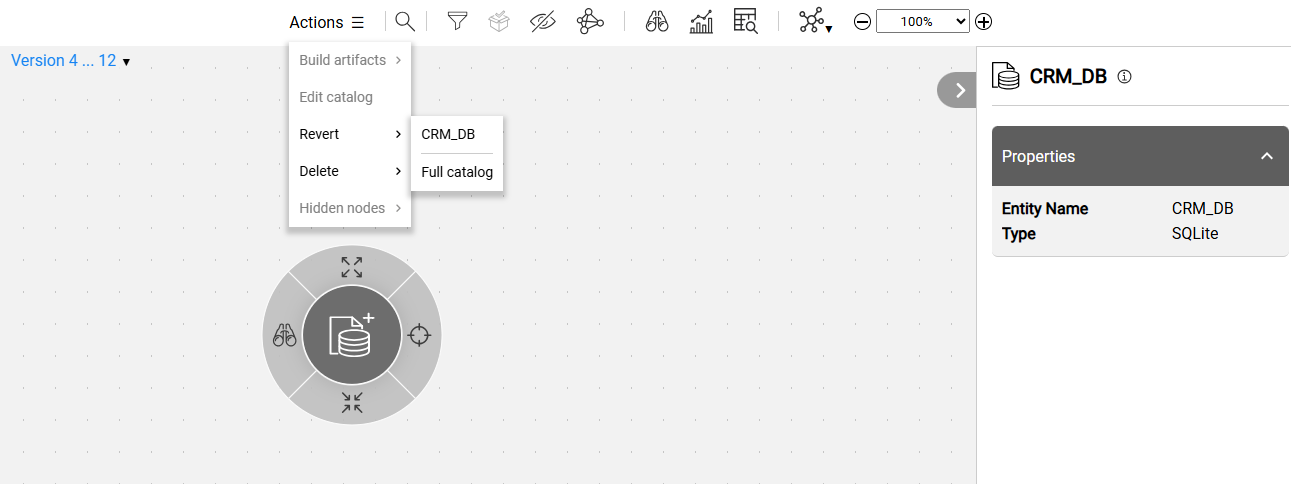
Upon successful completion of the revert, a new Catalog version is created.
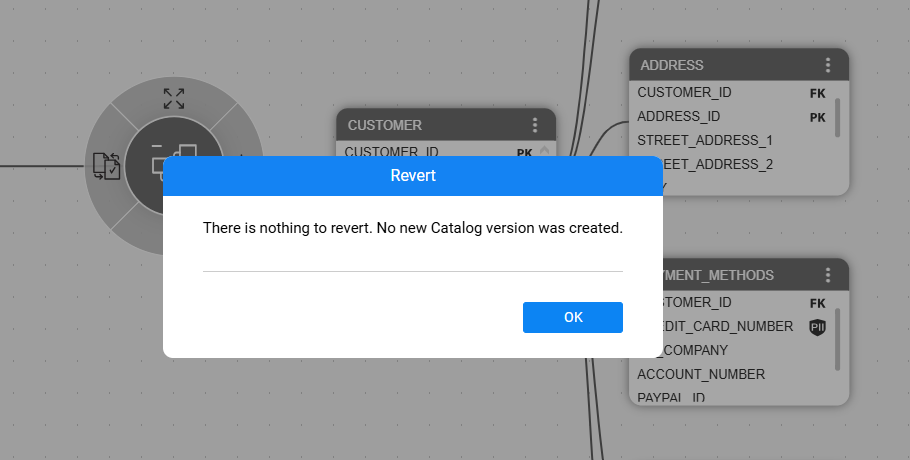
When there are no differences between the selected versions, the user is notified, and a new version is not created:
Revert Catalog Version
Overview
K2view's Catalog supports versioning by creating a new Catalog version in the Neo4j Graph DB whenever the Discovery process detects differences from the previous version, either due to source changes or configuration updates.
If, after user verification, these changes are deemed irrelevant or incorrect, users may choose to revert to a previous Catalog version.
The Catalog allows reverting from the latest version to any earlier version. The revert can be applied to a selected data platform or the entire Catalog, generating a new version.
Reverting is available starting Fabric V8.4.
What is Revert?
Reverting a Catalog version involves creating a new version using a reverted list of changes. For example:
- If a node (e.g. table, field, property) was deleted, this node is added back.
- If a property value was updated, the property is assigned the previous (old) value.
- If the change was due to a manual override, this manual override is removed.
The revert can remove an entire data platform. For example, if CRM_DB was created in the Catalog V5 and the user chooses to revert the entire Catalog to V4, the CRM_DB will be removed from the Catalog tree.
Reverting a revert version cancels the last changes. For example, when running a revert from V4 to V3, a Revert version V5 is created. Now, running revert from V5 to V4 will created a Revert version V6 which is identical to V4.
How Can I Initiate Revert?
To initiate a revert, switch to the Catalog's comparison mode by clicking the comparison icon in the version drop-down list. Then navigate to the menu bar and click Actions > Revert. You can choose to revert either the selected (or expanded) data platform or the entire Catalog.
The revert process begins once the user confirms the action.
Upon successful completion of the revert, a new Catalog version is created.
When there are no differences between the selected versions, the user is notified, and a new version is not created:
