


Create Your First Project
Overview
A Project is required before creating a Space.
The Project represents the K2view implementation and connects K2cloud to the Git repository containing the project source. It also defines the Space Profiles that can be used when creating Spaces for the Project.
A Project can have multiple Spaces, allowing the same implementation to be deployed into development, QA, staging, production, or other environments.
Before You Begin
Before creating a Project, you need:
- a Project name,
- the Git repository URL,
- a Git token that K2cloud can use to access the repository,
- and the Space Profile or Profiles to associate with the Project.
K2view typically recommends the appropriate Space Profiles during initial provisioning and planning.
For information about the available profiles, see K2cloud Space Profiles.
Create the Project
- Sign in to the K2cloud Orchestrator at:
https://cloud.k2view.com
- Select Projects from the top-level navigation.
- Select Create Project.
- Enter the Project name.
- Enter the Git repository information required by the Project.
- Select the Space Profile or Profiles that can be used by the Project.
- Create the Project.
After the Project is created, it appears on the Projects page and can be used to create Spaces.
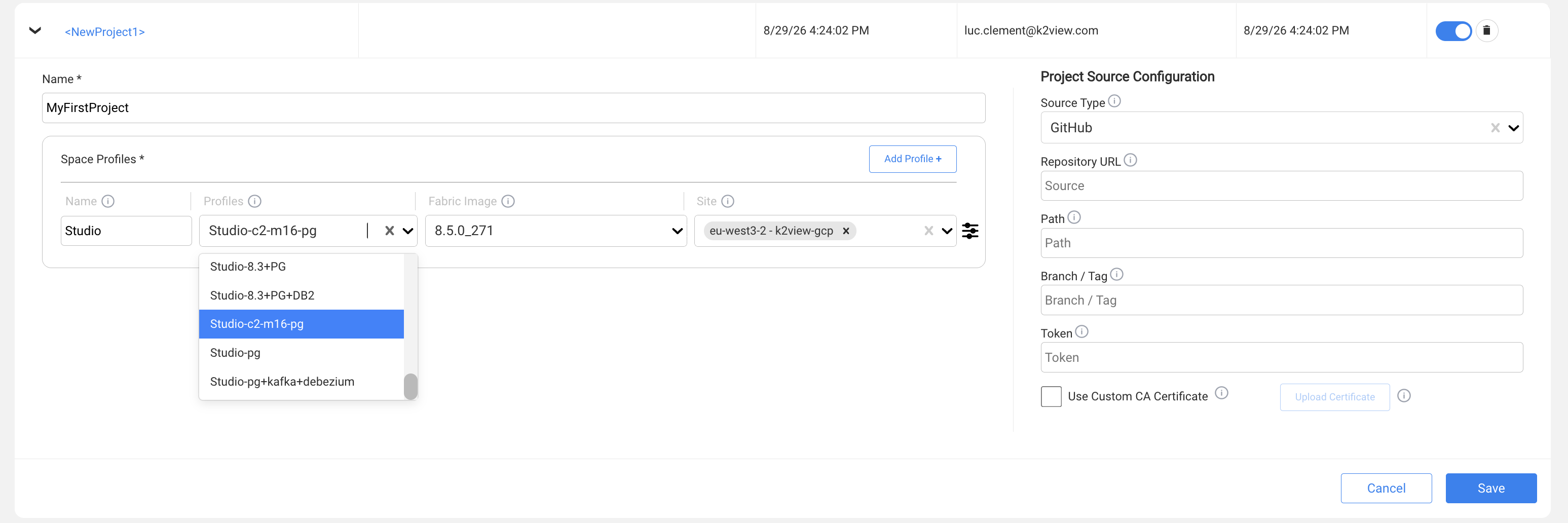
Project Name
Choose a Project name that clearly identifies the implementation to the users and administrators who will operate its Spaces.
A Project typically represents an application, program, or implementation rather than a particular runtime environment.
For example, development and production environments for the same implementation would normally be separate Spaces associated with the same Project rather than separate Projects.
Git Repository
The Project associates K2cloud with the Git repository containing the K2view project source.
The Git token configured for the Project is used by K2cloud to read project content from the repository when creating and deploying Spaces. It does not provide Git access to individual developers.
Developers who use Fabric Studio to commit and push project changes authenticate to Git using their own credentials, such as a personal access token (PAT). Repository permissions and developer access are managed by the Git platform rather than by K2cloud.
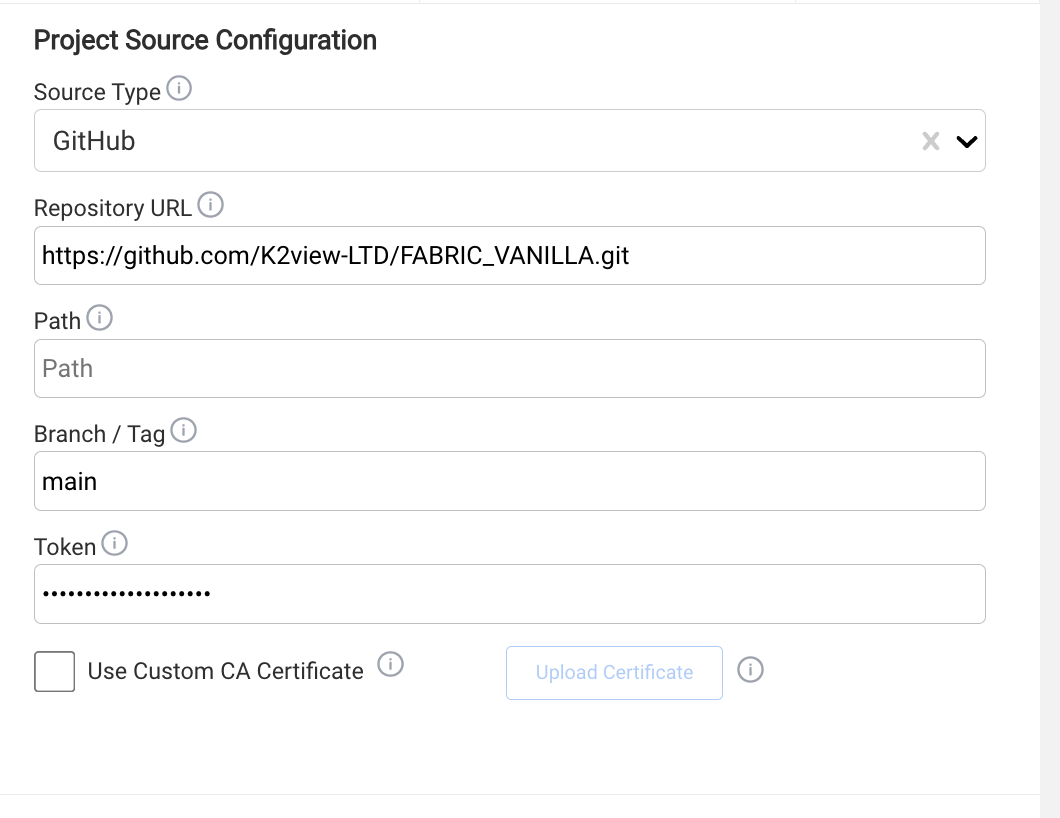
Space Profiles
A Project can be associated with one or more Space Profiles.
A Space Profile defines the runtime topology and resources available when creating a Space. Different profiles can therefore be associated with the same Project for different types of environments.
For example, a Project might make both a Studio development profile and a Fabric runtime profile available for Space creation.
The Fabric Image used by a profile can be selected and updated independently of the profile's runtime topology.
For more information, see K2cloud Space Profiles.
What the Project Does Not Define
Creating a Project does not create a runtime environment.
The Site is selected when a Space is created. The Site determines where that particular Space is deployed.
Similarly, the Project itself does not represent development, QA, staging, or production. Those environments are represented by Spaces created for the Project.
Conceptually:
Project + Space Profile + Fabric Image + Site → Space
Next Step
After creating the Project, determine which Space Profile, Fabric Image, and Site should be used for the Space.
Create Your First Project
Overview
A Project is required before creating a Space.
The Project represents the K2view implementation and connects K2cloud to the Git repository containing the project source. It also defines the Space Profiles that can be used when creating Spaces for the Project.
A Project can have multiple Spaces, allowing the same implementation to be deployed into development, QA, staging, production, or other environments.
Before You Begin
Before creating a Project, you need:
- a Project name,
- the Git repository URL,
- a Git token that K2cloud can use to access the repository,
- and the Space Profile or Profiles to associate with the Project.
K2view typically recommends the appropriate Space Profiles during initial provisioning and planning.
For information about the available profiles, see K2cloud Space Profiles.
Create the Project
- Sign in to the K2cloud Orchestrator at:
https://cloud.k2view.com
- Select Projects from the top-level navigation.
- Select Create Project.
- Enter the Project name.
- Enter the Git repository information required by the Project.
- Select the Space Profile or Profiles that can be used by the Project.
- Create the Project.
After the Project is created, it appears on the Projects page and can be used to create Spaces.
Project Name
Choose a Project name that clearly identifies the implementation to the users and administrators who will operate its Spaces.
A Project typically represents an application, program, or implementation rather than a particular runtime environment.
For example, development and production environments for the same implementation would normally be separate Spaces associated with the same Project rather than separate Projects.
Git Repository
The Project associates K2cloud with the Git repository containing the K2view project source.
The Git token configured for the Project is used by K2cloud to read project content from the repository when creating and deploying Spaces. It does not provide Git access to individual developers.
Developers who use Fabric Studio to commit and push project changes authenticate to Git using their own credentials, such as a personal access token (PAT). Repository permissions and developer access are managed by the Git platform rather than by K2cloud.
Space Profiles
A Project can be associated with one or more Space Profiles.
A Space Profile defines the runtime topology and resources available when creating a Space. Different profiles can therefore be associated with the same Project for different types of environments.
For example, a Project might make both a Studio development profile and a Fabric runtime profile available for Space creation.
The Fabric Image used by a profile can be selected and updated independently of the profile's runtime topology.
For more information, see K2cloud Space Profiles.
What the Project Does Not Define
Creating a Project does not create a runtime environment.
The Site is selected when a Space is created. The Site determines where that particular Space is deployed.
Similarly, the Project itself does not represent development, QA, staging, or production. Those environments are represented by Spaces created for the Project.
Conceptually:
Project + Space Profile + Fabric Image + Site → Space
Next Step
After creating the Project, determine which Space Profile, Fabric Image, and Site should be used for the Space.
