


Upgrading Fabric and Studio with K2cloud
Table of Contents
- Overview
- K2cloud Deployment Models
- Upgrade Workflow
- At A Glance
- Video Walkthrough
- Related Upgrade Procedures
Overview
K2cloud supports self-service upgrades and rollbacks for both Studio and Fabric Spaces.
Beginning with the November 2025 release, K2cloud introduced:
- Project-level version promotion
- Versionless Space Profiles
- One-click upgrades and rollbacks
- Enhanced runtime observability through the Space Details page
K2view automatically publishes available Fabric releases to the Projects page and makes them available for Space Profile configuration. Customers no longer need to ask K2view to configure each newly available Fabric version for their environment.
The upgrade workflow separates operational responsibilities between:
- K2view, which publishes available Fabric releases
- Project Managers, who select the appropriate runtime version for Space Profiles
- Space Owners, who execute upgrades and rollbacks on individual Spaces
This operational model allows organizations to:
- Access newly available Fabric releases without customer-specific version configuration by K2view
- Validate versions progressively
- Standardize deployment behavior
- Coordinate upgrades safely across development, QA, staging, and production environments
Note: This procedure applies to Fabric environments managed through K2cloud. For Fabric installations deployed directly on Linux servers, refer to the Fabric Upgrade Procedure (Linux Installations) in the Upgrade Fabric section.
K2cloud Deployment Models
K2cloud supports two deployment models:
The version-selection, upgrade, monitoring, validation, and rollback workflows are otherwise the same for both deployment models.
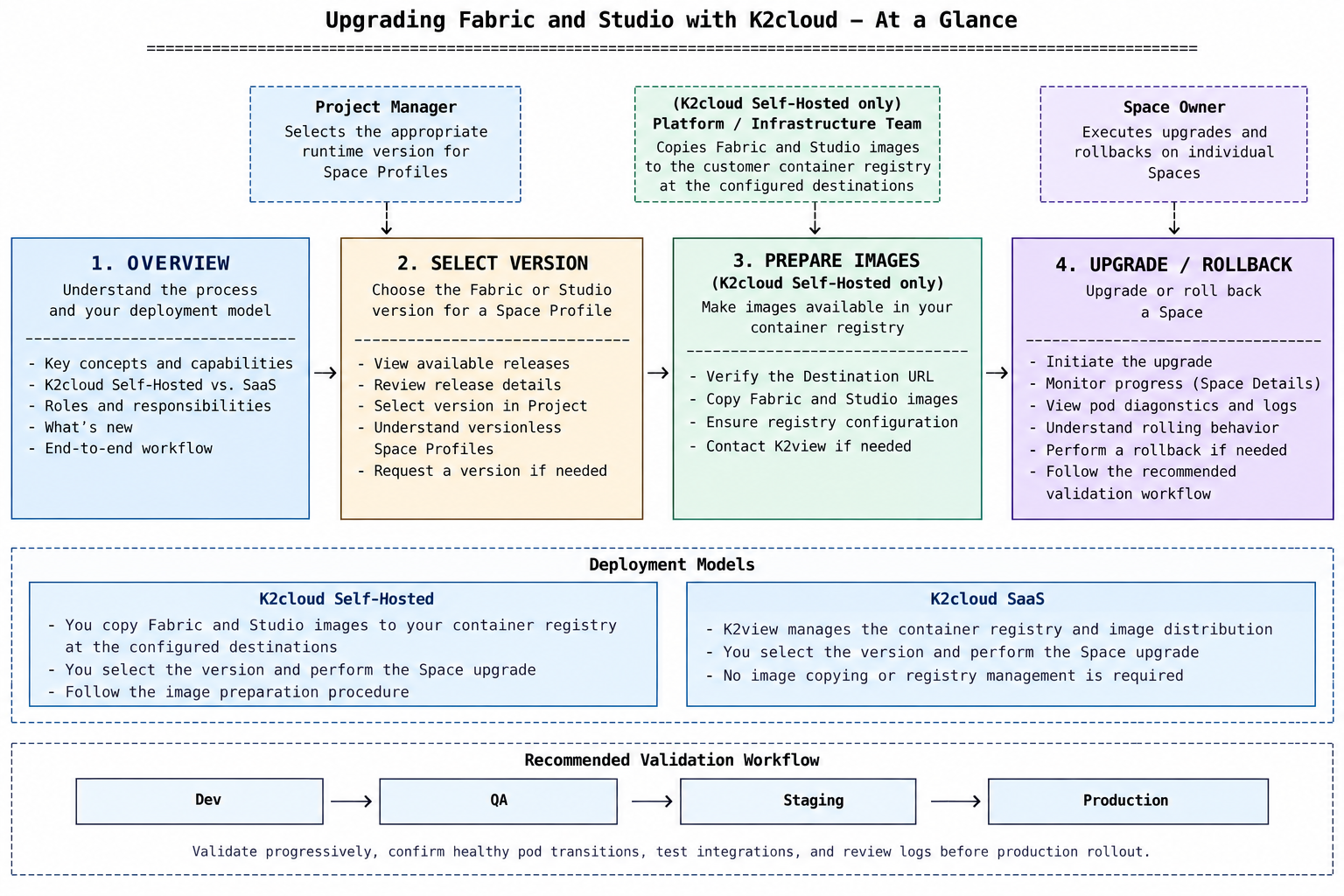
At a Glance
Upgrade Workflow
The K2cloud upgrade workflow consists of the following steps:
- Select the version — Review available releases and select the required Fabric Image for the appropriate Space Profile.
- Prepare the images — For customer-managed K2cloud, make the required Fabric and Studio images available in the customer container registry. K2view manages this step for K2cloud SaaS.
- Upgrade the Space — Initiate the upgrade from the Space tile and monitor its progress.
- Validate the upgrade — Validate the upgraded Space before progressing the release through additional environments.
- Rollback if necessary — If a prior Fabric Image version remains available, K2cloud supports rollback using the same Space upgrade workflow. 6.
Video Walkthrough
You can get an overview of the K2cloud upgrade capabilities at:
https://download.k2view.com/index.php/s/3rgZczMc6eEOU7t
Related Upgrade Procedures
For detailed instructions, see:
Upgrading Fabric and Studio with K2cloud
Table of Contents
- Overview
- K2cloud Deployment Models
- Upgrade Workflow
- At A Glance
- Video Walkthrough
- Related Upgrade Procedures
Overview
K2cloud supports self-service upgrades and rollbacks for both Studio and Fabric Spaces.
Beginning with the November 2025 release, K2cloud introduced:
- Project-level version promotion
- Versionless Space Profiles
- One-click upgrades and rollbacks
- Enhanced runtime observability through the Space Details page
K2view automatically publishes available Fabric releases to the Projects page and makes them available for Space Profile configuration. Customers no longer need to ask K2view to configure each newly available Fabric version for their environment.
The upgrade workflow separates operational responsibilities between:
- K2view, which publishes available Fabric releases
- Project Managers, who select the appropriate runtime version for Space Profiles
- Space Owners, who execute upgrades and rollbacks on individual Spaces
This operational model allows organizations to:
- Access newly available Fabric releases without customer-specific version configuration by K2view
- Validate versions progressively
- Standardize deployment behavior
- Coordinate upgrades safely across development, QA, staging, and production environments
Note: This procedure applies to Fabric environments managed through K2cloud. For Fabric installations deployed directly on Linux servers, refer to the Fabric Upgrade Procedure (Linux Installations) in the Upgrade Fabric section.
K2cloud Deployment Models
K2cloud supports two deployment models:
The version-selection, upgrade, monitoring, validation, and rollback workflows are otherwise the same for both deployment models.
At a Glance
Upgrade Workflow
The K2cloud upgrade workflow consists of the following steps:
- Select the version — Review available releases and select the required Fabric Image for the appropriate Space Profile.
- Prepare the images — For customer-managed K2cloud, make the required Fabric and Studio images available in the customer container registry. K2view manages this step for K2cloud SaaS.
- Upgrade the Space — Initiate the upgrade from the Space tile and monitor its progress.
- Validate the upgrade — Validate the upgraded Space before progressing the release through additional environments.
- Rollback if necessary — If a prior Fabric Image version remains available, K2cloud supports rollback using the same Space upgrade workflow. 6.
Video Walkthrough
You can get an overview of the K2cloud upgrade capabilities at:
https://download.k2view.com/index.php/s/3rgZczMc6eEOU7t
Related Upgrade Procedures
For detailed instructions, see:
