


Installation
Prerequisites
Before installing Verify, ensure the following requirements are met:
| Requirement | Details |
|---|---|
| Fabric version | 8.2 or higher (certified on 8.3.4) |
| PostgreSQL | Integrated and available in your project (certified on PostgreSQL 17) |
⚠️ Important: The project must have a working PostgreSQL integration before deploying Verify. This is used to store all operational data and report results.
Installation
Install from K2 Exchange
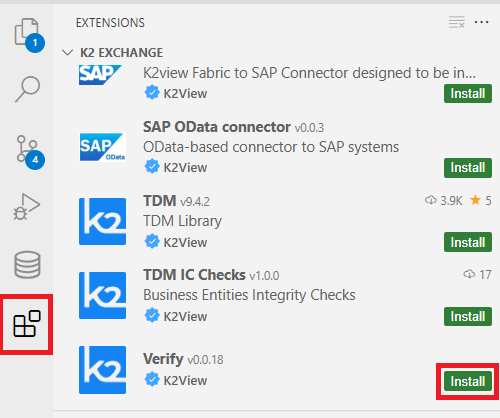
- Open Fabric Studio Web.
- Click the Extensions icon in the left sidebar.
- Search for
Verify. - Click Install.
Post-Installation Validation
After installation, confirm the following components are present in your Cloud Space:
Logical Units
verify
Shared Objects
Broadway:
- Folder
k2verify— contains all Broadway flows provided by the product.
- Folder
Java:
- Resource file
resources/k2verify— SQL create statements for operational and report tables. - Java folder
common/k2verify— Java logic used by the product.
- Resource file
Interfaces:
Libraries
lib/postgresql-42.7.10.jar
Web App Integration
To add Verify to the studio navigation:
- In your Cloud Studio, open the existing
apps.jsonfile. - Add the following entry to the JSON array:
{ "name": "Verify", "appId": "verify" }
- Save the file and confirm the JSON structure remains valid.
Installation
Prerequisites
Before installing Verify, ensure the following requirements are met:
| Requirement | Details |
|---|---|
| Fabric version | 8.2 or higher (certified on 8.3.4) |
| PostgreSQL | Integrated and available in your project (certified on PostgreSQL 17) |
⚠️ Important: The project must have a working PostgreSQL integration before deploying Verify. This is used to store all operational data and report results.
Installation
Install from K2 Exchange
- Open Fabric Studio Web.
- Click the Extensions icon in the left sidebar.
- Search for
Verify. - Click Install.
Post-Installation Validation
After installation, confirm the following components are present in your Cloud Space:
Logical Units
verify
Shared Objects
Broadway:
- Folder
k2verify— contains all Broadway flows provided by the product.
- Folder
Java:
- Resource file
resources/k2verify— SQL create statements for operational and report tables. - Java folder
common/k2verify— Java logic used by the product.
- Resource file
Interfaces:
Libraries
lib/postgresql-42.7.10.jar
Web App Integration
To add Verify to the studio navigation:
- In your Cloud Studio, open the existing
apps.jsonfile. - Add the following entry to the JSON array:
{ "name": "Verify", "appId": "verify" }
- Save the file and confirm the JSON structure remains valid.
