


Agentic Flow & Agents in Practice
This article provides a practical, implementation-focused guide to the agents that participate in the Agentic Flow within the AI Fusion framework.
While The Agentic Flow article explains the conceptual execution model — how decisions are made, how paths are selected, and how responsibilities are delegated — this article translates these concepts into actual agents, focusing on how to set built-in agent attributes and how to create, configure, and reference sub-agents.
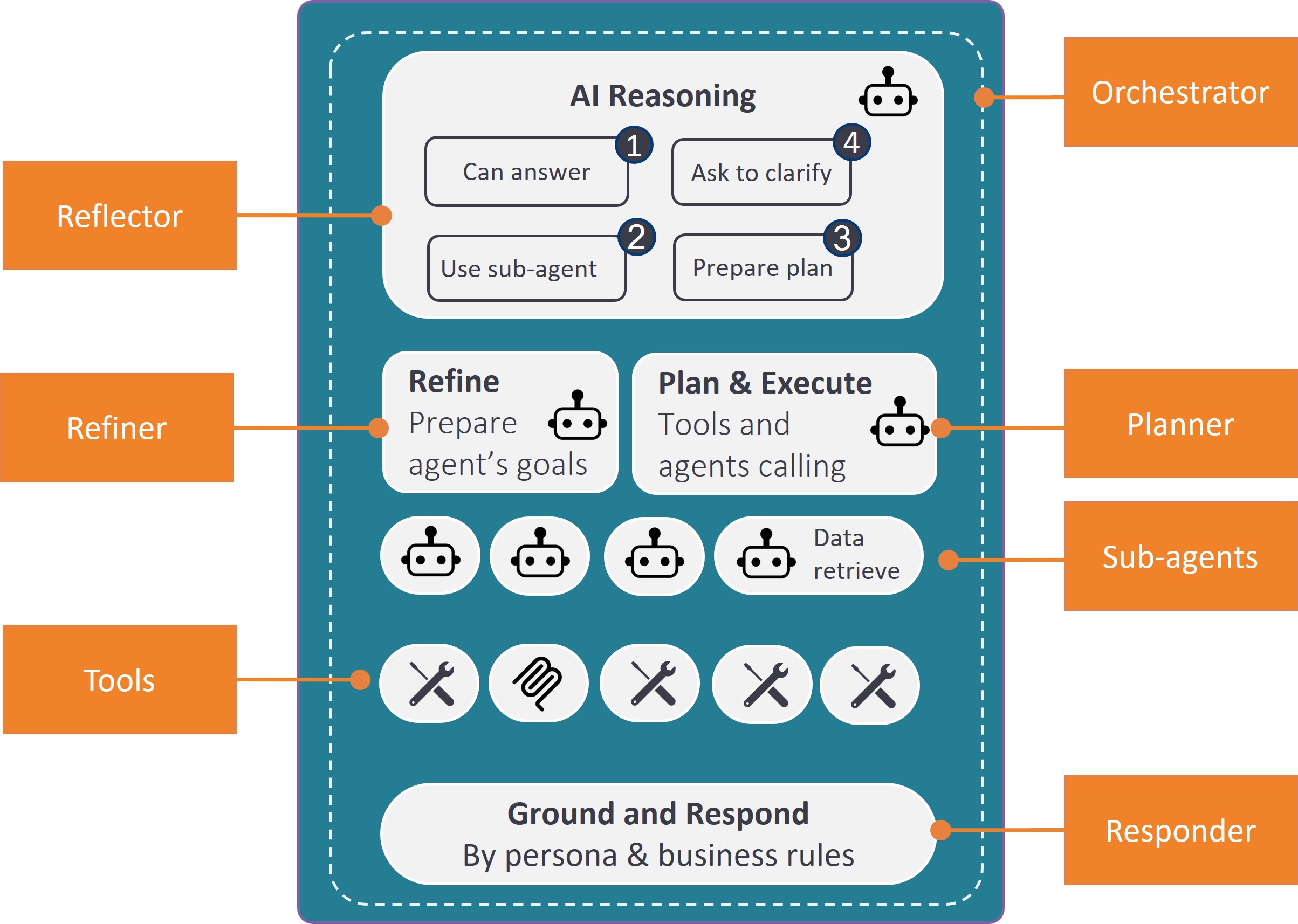
The following diagram illustrates a typical agentic flow, as viewed from the perspective of AI Fusion agents and tools:
The Orchestrator
When the conversation entry-point flow calls the Orchestrator actor, it passes several input parameters. These inputs and attributes are then used by the Orchestrator flow itself and by its complementary agents — Reflector, Refiner and Planner. All these agents can be considered building blocks that you do not need to touch.
The Planner
If a request requires gathering information or executing multiple steps but does not match a predefined sub-agent, the orchestrator_planner is triggered.
The LLM is tasked with generating a step-by-step execution plan using several resources:
- Tools and Agent List: A list of available and relevant (by tags) Broadway flows, along with descriptions and remarks added to input parameters. The LLM uses these descriptions to choose the most-suitable tool and determine the required inputs. Relevant sub-agents (by tag) are also providers.
- Sample Plans (Optional): JSON files (e.g.,
Banking_plans.json) — containing pre-built templates — that show the LLM how to combine tools to accomplish similar objectives. - Corporate Procedures (Optional): Documents that define business rules or provide step-by-step instructions (e.g., verification criteria for credit limit reduction).
Once the plan steps are prepared, the Planner executes them step-by-step.
Note: It is a best practice to rely on sub-agents to achieve a higher performance, as the Planner approach is slower and less predictable due to the required plan-generation step.
The Worker Sub-agents
A worker sub-agent is a tagged Broadway flow (for example, loans_subagent) designed to handle a specific domain or category of requests, such as banking loans.
Sub-agent Discovery
The Reflector agent:
- Searches for flows with agent tags
- Examines the flow descriptions
- Identifies the specialized agent best suited for the current task
When an appropriate sub-agent is found, the Orchestrator calls the Refiner agent to prepare the sub-agent's goal based on the user request and context.
Notes:
- Use the sub-agent Broadway flow properties to add tags and descriptions.
- Agent tags are specified as an attribute of the Orchestrator agent. Providing it with all flows tagged as sub-agents can confuse and overwhelm the agent when selecting the appropriate sub-agent.
Sub-agent Card
Input
When invoking a sub-agent, it receives detailed context, including:
- Its Role and Objectives (as a system message).
- Domain Data (details on relevant LUs, reference tables, column names, and descriptions) to enable dynamic SQL query construction.
- A specific List of Tools (other Broadway flows) tailored to the domain.
Logic
A typical sub-agent is composed of logic steps alongside LLMAgent actor usage, providing improved control and reliability.
The LLMAgent actor decides which tools to activate and how to formulate responses based on:
- Predefined Domain Data — retrieved using a DBCommand actor
- Schema Information — tables relevant for SQL crafting
- System Prompt — contains agent goals and behavioral guidelines
- User Prompt — the refined user query
- Tool List — available tools that the AI can invoke
Use Broadway flow properties to add tags and descriptions to sub-agent flows. The framework uses these properties to select the appropriate agent for each request.
Agentic Flow & Agents in Practice
This article provides a practical, implementation-focused guide to the agents that participate in the Agentic Flow within the AI Fusion framework.
While The Agentic Flow article explains the conceptual execution model — how decisions are made, how paths are selected, and how responsibilities are delegated — this article translates these concepts into actual agents, focusing on how to set built-in agent attributes and how to create, configure, and reference sub-agents.
The following diagram illustrates a typical agentic flow, as viewed from the perspective of AI Fusion agents and tools:
The Orchestrator
When the conversation entry-point flow calls the Orchestrator actor, it passes several input parameters. These inputs and attributes are then used by the Orchestrator flow itself and by its complementary agents — Reflector, Refiner and Planner. All these agents can be considered building blocks that you do not need to touch.
The Planner
If a request requires gathering information or executing multiple steps but does not match a predefined sub-agent, the orchestrator_planner is triggered.
The LLM is tasked with generating a step-by-step execution plan using several resources:
- Tools and Agent List: A list of available and relevant (by tags) Broadway flows, along with descriptions and remarks added to input parameters. The LLM uses these descriptions to choose the most-suitable tool and determine the required inputs. Relevant sub-agents (by tag) are also providers.
- Sample Plans (Optional): JSON files (e.g.,
Banking_plans.json) — containing pre-built templates — that show the LLM how to combine tools to accomplish similar objectives. - Corporate Procedures (Optional): Documents that define business rules or provide step-by-step instructions (e.g., verification criteria for credit limit reduction).
Once the plan steps are prepared, the Planner executes them step-by-step.
Note: It is a best practice to rely on sub-agents to achieve a higher performance, as the Planner approach is slower and less predictable due to the required plan-generation step.
The Worker Sub-agents
A worker sub-agent is a tagged Broadway flow (for example, loans_subagent) designed to handle a specific domain or category of requests, such as banking loans.
Sub-agent Discovery
The Reflector agent:
- Searches for flows with agent tags
- Examines the flow descriptions
- Identifies the specialized agent best suited for the current task
When an appropriate sub-agent is found, the Orchestrator calls the Refiner agent to prepare the sub-agent's goal based on the user request and context.
Notes:
- Use the sub-agent Broadway flow properties to add tags and descriptions.
- Agent tags are specified as an attribute of the Orchestrator agent. Providing it with all flows tagged as sub-agents can confuse and overwhelm the agent when selecting the appropriate sub-agent.
Sub-agent Card
Input
When invoking a sub-agent, it receives detailed context, including:
- Its Role and Objectives (as a system message).
- Domain Data (details on relevant LUs, reference tables, column names, and descriptions) to enable dynamic SQL query construction.
- A specific List of Tools (other Broadway flows) tailored to the domain.
Logic
A typical sub-agent is composed of logic steps alongside LLMAgent actor usage, providing improved control and reliability.
The LLMAgent actor decides which tools to activate and how to formulate responses based on:
- Predefined Domain Data — retrieved using a DBCommand actor
- Schema Information — tables relevant for SQL crafting
- System Prompt — contains agent goals and behavioral guidelines
- User Prompt — the refined user query
- Tool List — available tools that the AI can invoke
Use Broadway flow properties to add tags and descriptions to sub-agent flows. The framework uses these properties to select the appropriate agent for each request.
