


Build Artifacts
Building a Fabric project compiles the Java sources of each Logical Unit and packages them into deployment artifacts. The output per LU is:
- ludb.jar — compiled Java bytecode
- ludbXMLs.zip — LU configuration and schema metadata
These artifacts are the input for the deployment phase. They can be built and deployed in one step, or built once and deployed to multiple environments separately.
Building artifacts requires the Fabric package to be available, either installed on a server or provided as a Docker image. Fabric itself does not need to be running.
Build from Fabric Studio
To build artifacts in the Fabric Studio:
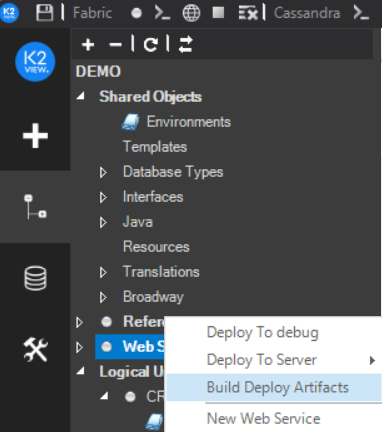
- Right-click the object (for example, Web Services) and click Build Deploy Artifacts. A notification displays following a successful build.
Right-click the same object and select Open Folder. Windows Explorer opens at:
[Your PC Folder]\K2View Fabric Studio\Projects\[Project Name]\Implementation\LogicalUnits\[LU Name]Locate the generated ludb.JAR and ludbXMLs.ZIP files.
Build on a Server using buildArtifacts.sh
Run buildArtifacts.sh on a server to compile and package the project artifacts. The script is located under $FABRIC_HOME/fabric/scripts.
Usage:
./buildArtifacts.sh -pd <PATH_TO_PROJECT> [options]
Options:
The options are passed as command-line arguments. They can also be set as environment variables before running the script, although passing them as arguments is the recommended approach.
Example — build all LUs:
./buildArtifacts.sh -pd /opt/apps/MyProject
Example — build specific LUs into a custom output directory:
./buildArtifacts.sh -pd /opt/apps/MyProject -l Customer,Orders -d /tmp/artifacts
After a successful build, each LU folder under the output directory contains ludb.jar and ludbXMLs.zip.
Next Step
Once artifacts are built, deploy them to the target Fabric server. See Deploy a Project.


Build Artifacts
Building a Fabric project compiles the Java sources of each Logical Unit and packages them into deployment artifacts. The output per LU is:
- ludb.jar — compiled Java bytecode
- ludbXMLs.zip — LU configuration and schema metadata
These artifacts are the input for the deployment phase. They can be built and deployed in one step, or built once and deployed to multiple environments separately.
Building artifacts requires the Fabric package to be available, either installed on a server or provided as a Docker image. Fabric itself does not need to be running.
Build from Fabric Studio
To build artifacts in the Fabric Studio:
- Right-click the object (for example, Web Services) and click Build Deploy Artifacts. A notification displays following a successful build.
Right-click the same object and select Open Folder. Windows Explorer opens at:
[Your PC Folder]\K2View Fabric Studio\Projects\[Project Name]\Implementation\LogicalUnits\[LU Name]Locate the generated ludb.JAR and ludbXMLs.ZIP files.
Build on a Server using buildArtifacts.sh
Run buildArtifacts.sh on a server to compile and package the project artifacts. The script is located under $FABRIC_HOME/fabric/scripts.
Usage:
./buildArtifacts.sh -pd <PATH_TO_PROJECT> [options]
Options:
The options are passed as command-line arguments. They can also be set as environment variables before running the script, although passing them as arguments is the recommended approach.
Example — build all LUs:
./buildArtifacts.sh -pd /opt/apps/MyProject
Example — build specific LUs into a custom output directory:
./buildArtifacts.sh -pd /opt/apps/MyProject -l Customer,Orders -d /tmp/artifacts
After a successful build, each LU folder under the output directory contains ludb.jar and ludbXMLs.zip.
Next Step
Once artifacts are built, deploy them to the target Fabric server. See Deploy a Project.
