


Auditing Mechanism — Filtering
The list of activities reported by the Auditing mechanism can be controlled.
Once the AUDIT parameter is set to ON, all Fabric activities are logged by the Fabric Auditing mechanism.
In order to refine auditing to a specific predefined list of activities, the AUDIT_FILTER_STRATEGY parameter should be populated with the full path of the class that defines the filtering strategy.
How Can I Define the Auditing Filter?
Defining the auditing filter starts with the sample provided as part of the Fabric installation, which you can then modify as needed.
Alternatively, you can create a new class under the com.k2view.external.fabric.audit.filters folder. Note that the filter class should implement the com.k2view.external.fabric.audit.filters.AuditingFilter interface.
Follow the following steps in order to build the artifacts:
Copy the project located under $K2_HOME/fabric/samples/AuditCustomStrategies locally.
- For example, copy from C:\K2View\Fabric_6.5\Server\fabric\samples\AuditCustomStrategies to your local AuditCustomStrategies directory.
Create a directory named k2view-libs under the AuditCustomStrategies directory.
Copy the files $K2_HOME/fabric/lib/fabric/fabric-common-[version-num].jar and auditing-[version-num].jar to your local k2view-libs folder.
Open IntelliJ IDE.
Import project AuditCustomStrategies via the IntelliJ menu File > New > Project from Existing Source.
Choose libraries using the IntelliJ menu: File > Project Structure, or by pressing CTRL+ALT+SHIFT+S.
In the Project Structure window, click Libraries > + icon > Java and select the top two Jars.
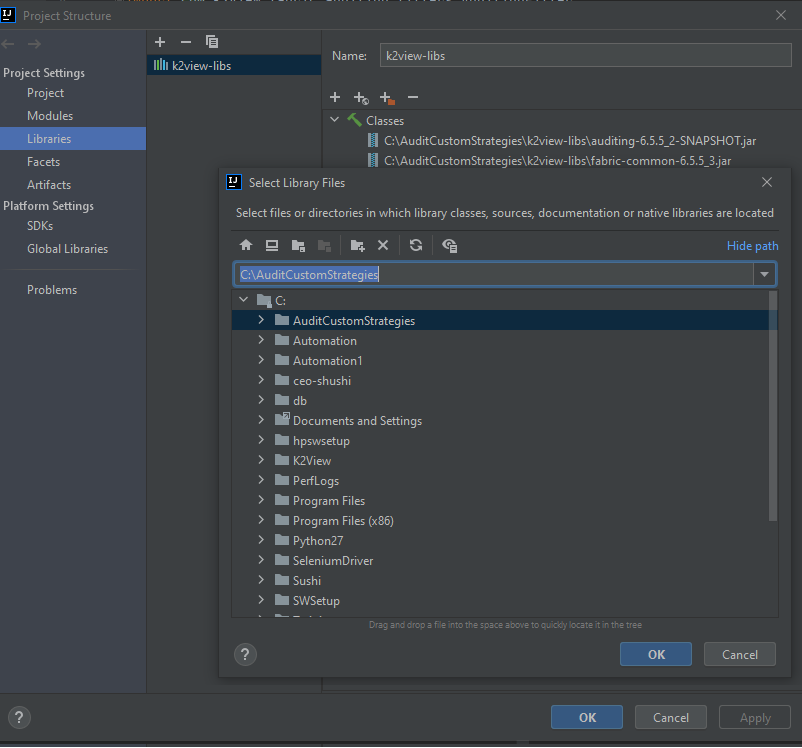
Click OK.
In the Project Structure window, click Artifacts > + icon > JAR > From modules with dependencies…
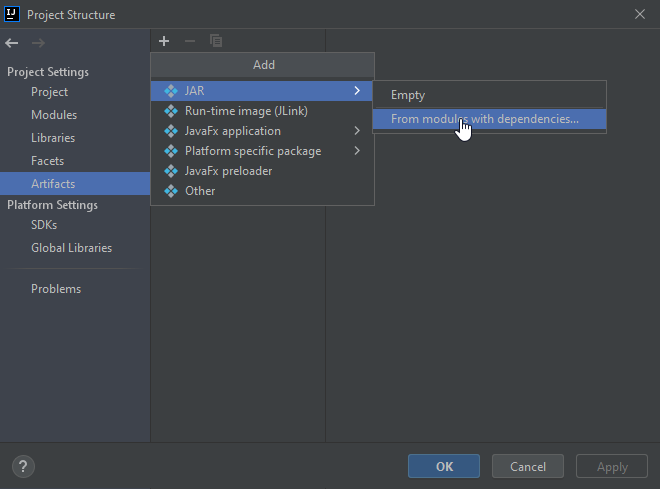
- Choose the Main class, which can be either All, filter strategies or persistency strategies.
- Click OK.
Click Build > Build Artifacts in the IntelliJ menu and select the Build action.
The artifacts are created under the AuditCustomStrategies/out/artifacts folder.
Copy the created JARs artifact to the $K2_HOME/ExternalJars directory.
Update the config.ini file with the full path of the filtering class in the AUDIT_FILTER_STRATEGY parameter.
AUDIT_FILTER_STRATEGY=com.k2view.external.fabric.audit.filters.SampleFilterVerify that AUDIT is set to ON in the config.ini file.
AUDIT=ONRestart the Fabric node.
Reporting on Web Services Only — Example
The following example displays the com.k2view.external.fabric.audit.filters.SampleFilter filter class, which audits only Web Service calls.
   package com.k2view.external.fabric.audit.filters;
   import com.k2view.fabric.common.Log;
   import com.k2view.fabric.auditing.AuditBean;
   import com.k2view.fabric.auditing.filters.AuditingFilter;

   public class SampleFilter implements AuditingFilter {
     @Override
     public boolean filter(AuditBean auditBean) {
       /*
       \* Here you should add your code
       \* When return false - the bean will not be audited
       \* When return true - the bean will be audited
       */
       if (auditBean.getAction().toLowerCase().contains("ws") || auditBean.getProtocol().toLowerCase().contains("http"))
        {
            Log.a(SampleFilter.class).info("Bean {} is passes the filter layer", auditBean.toString());
            return true;
        }
        else
        {
            Log.a(SampleFilter.class).info("Bean {} is filtered out by the filter layer", auditBean.toString());
            return false;
        }
     }
   }
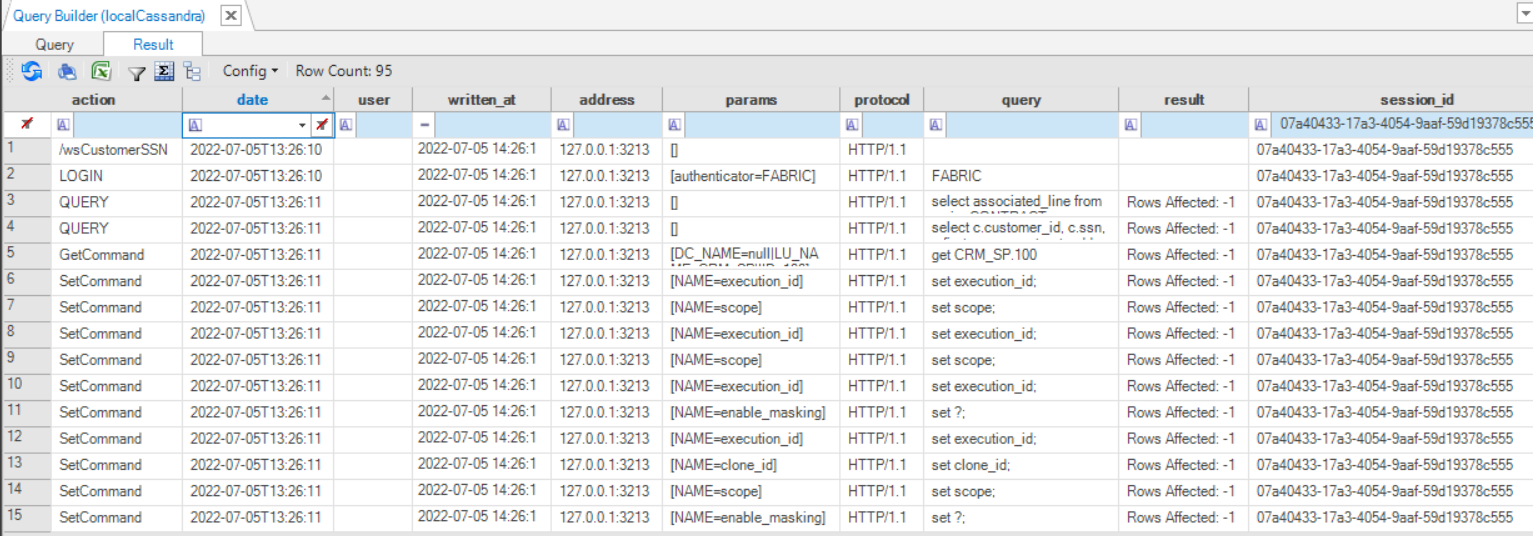
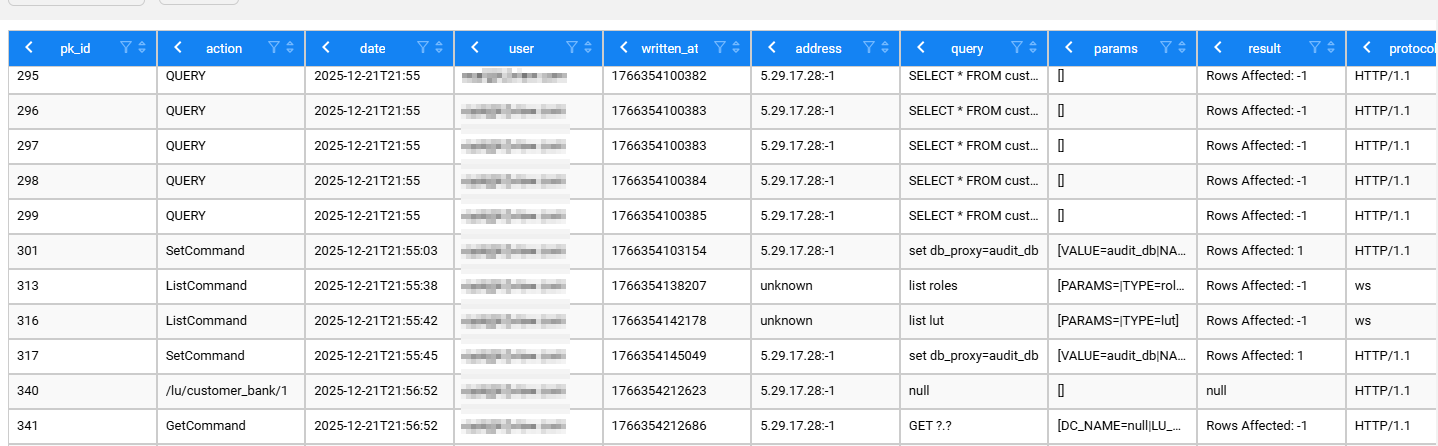
The Web Service calls are populated in the k2_auditing table in system DB as follows:


Auditing Mechanism — Filtering
The list of activities reported by the Auditing mechanism can be controlled.
Once the AUDIT parameter is set to ON, all Fabric activities are logged by the Fabric Auditing mechanism.
In order to refine auditing to a specific predefined list of activities, the AUDIT_FILTER_STRATEGY parameter should be populated with the full path of the class that defines the filtering strategy.
How Can I Define the Auditing Filter?
Defining the auditing filter starts with the sample provided as part of the Fabric installation, which you can then modify as needed.
Alternatively, you can create a new class under the com.k2view.external.fabric.audit.filters folder. Note that the filter class should implement the com.k2view.external.fabric.audit.filters.AuditingFilter interface.
Follow the following steps in order to build the artifacts:
Copy the project located under $K2_HOME/fabric/samples/AuditCustomStrategies locally.
- For example, copy from C:\K2View\Fabric_6.5\Server\fabric\samples\AuditCustomStrategies to your local AuditCustomStrategies directory.
Create a directory named k2view-libs under the AuditCustomStrategies directory.
Copy the files $K2_HOME/fabric/lib/fabric/fabric-common-[version-num].jar and auditing-[version-num].jar to your local k2view-libs folder.
Open IntelliJ IDE.
Import project AuditCustomStrategies via the IntelliJ menu File > New > Project from Existing Source.
Choose libraries using the IntelliJ menu: File > Project Structure, or by pressing CTRL+ALT+SHIFT+S.
In the Project Structure window, click Libraries > + icon > Java and select the top two Jars.
Click OK.
In the Project Structure window, click Artifacts > + icon > JAR > From modules with dependencies…
- Choose the Main class, which can be either All, filter strategies or persistency strategies.
- Click OK.
Click Build > Build Artifacts in the IntelliJ menu and select the Build action.
The artifacts are created under the AuditCustomStrategies/out/artifacts folder.
Copy the created JARs artifact to the $K2_HOME/ExternalJars directory.
Update the config.ini file with the full path of the filtering class in the AUDIT_FILTER_STRATEGY parameter.
AUDIT_FILTER_STRATEGY=com.k2view.external.fabric.audit.filters.SampleFilterVerify that AUDIT is set to ON in the config.ini file.
AUDIT=ONRestart the Fabric node.
Reporting on Web Services Only — Example
The following example displays the com.k2view.external.fabric.audit.filters.SampleFilter filter class, which audits only Web Service calls.
   package com.k2view.external.fabric.audit.filters;
   import com.k2view.fabric.common.Log;
   import com.k2view.fabric.auditing.AuditBean;
   import com.k2view.fabric.auditing.filters.AuditingFilter;

   public class SampleFilter implements AuditingFilter {
     @Override
     public boolean filter(AuditBean auditBean) {
       /*
       \* Here you should add your code
       \* When return false - the bean will not be audited
       \* When return true - the bean will be audited
       */
       if (auditBean.getAction().toLowerCase().contains("ws") || auditBean.getProtocol().toLowerCase().contains("http"))
        {
            Log.a(SampleFilter.class).info("Bean {} is passes the filter layer", auditBean.toString());
            return true;
        }
        else
        {
            Log.a(SampleFilter.class).info("Bean {} is filtered out by the filter layer", auditBean.toString());
            return false;
        }
     }
   }
The Web Service calls are populated in the k2_auditing table in system DB as follows:
