


Auditing Mechanism — Persistence
The persistence of the data reported by the Auditing mechanism can be controlled. Fabric offers three persistence options that are written to:
- System DB — com.k2view.fabric.auditing.persistence.SystemDbBeanPersistence (default) — audit data is written to k2_auditing table in the metadata keyspace (k2audit by default).
- Kafka — com.k2view.fabric.auditing.persistence.KafkaBeanPersistence — audit data is written to the default k2audit topic.
- Fabric log — com.k2view.fabric.auditing.persistence.AuditLog — audit data is written to the k2Fabric log files.
To update the persistence strategy, set the AUDIT_PERSISTENCE_STRATEGY parameter using the K2admin's Configuration tab. As mentioned above, this parameter defaults to com.k2view.fabric.auditing.persistence.SystemDbBeanPersistence.
In addition to the above persistence strategies offered by Fabric, a new strategy can be defined by creating a custom class. The required steps are explained further in this article.
How Can I Set The Persistence Strategy to Kafka?
In order to switch the persistence strategy to Kafka, perform the following actions using the K2admin's Configuration tab:
- Update the AUDIT_PERSISTENCE_STRATEGY parameter to:
AUDIT_PERSISTENCE_STRATEGY = com.k2view.fabric.auditing.persistence.KafkaBeanPersistence
- Verify that AUDIT is set to ON.
AUDIT=ON
Configure the Kafka producer using the relevant parameters in the [audit_kafka_producer] section.
Restart the Fabric node.
Logging Audit Data to PostgreSQL via Kafka — Example
When there is a requirement to make the audit records available to another channel, the persistence strategy should be changed from System DB to Kafka.
For example, when Audit records need to be logged into an external DB, they can be published to Kafka. To do this, update the AUDIT_PERSISTENCE_STRATEGY parameter in Fabric Configuration to com.k2view.fabric.auditing.persistence.KafkaBeanPersistence and restart the Fabric node as explained above.
Then, create a Broadway flow that will consume the Kafka messages and load them into your required target DB.
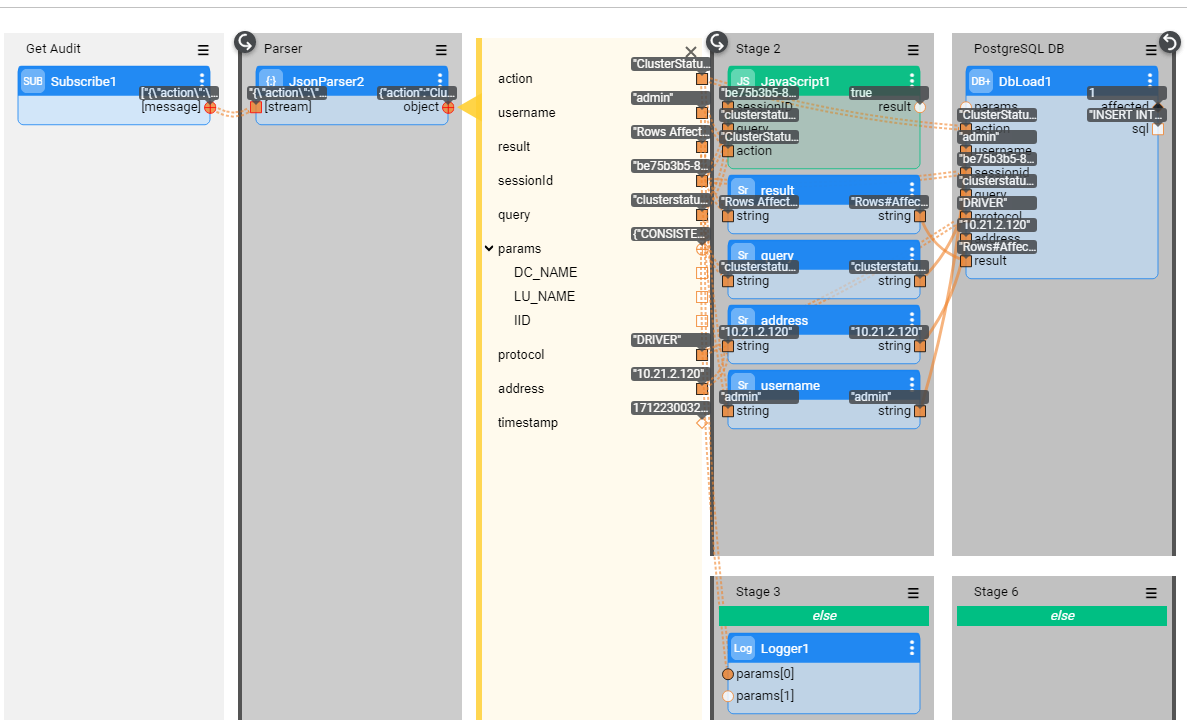
The following Broadway flow consumes Audit messages from a Kafka topic and loads them into the target PostgreSQL DB.
The Kafka message appears as follows:
{
    "action": "GetCommand",
    "username": "admin",
    "result": "LU type 'OracleLu' not found. Please deploy it using K2view Fabric Studio",
    "sessionId": "264adf99",
    "query": "get OracleLu.5 ",
    "params": {
        "DC_NAME": "null",
        "LU_NAME": "OracleLu",
        "IID": "5"
    },
    "protocol": "DRIVER",
    "address": "127.0.0.1"
}
How Can I Define A New Persistence Strategy?
In order to define a new persistence strategy, you can create your own persistence strategy class. Alternatively, you can start with the com.k2view.external.fabric.audit.persistencies.SamplePersist sample class provided as part of the Fabric installation and modify it as needed.
In case of your own class, it must be created under the com.k2view.external.fabric.audit.persistencies folder and should implement the com.k2view.external.fabric.audit.filters.AuditBeanPersistence interface.
Build the artifacts by using the same steps as described in the 'Auditing Mechanism — Filtering' article. Then, perform the following actions:
- Update the AUDIT_PERSISTENCE_STRATEGY parameter in Fabric Configuration with the full path of the class. For example:
AUDIT_PERSISTENCE_STRATEGY = com.k2view.external.fabric.audit.persistencies.SamplePersist
- Verify that AUDIT is set to ON.
AUDIT=ON
- Restart the Fabric node.
Setting New Persistence Strategy — Example
The example shown below displays the com.k2view.external.fabric.audit.persistencies.SamplePersist persistence class, which writes audit operations into a file.
package com.k2view.external.fabric.audit.persistencies;

import com.k2view.fabric.common.Log;
import com.k2view.fabric.auditing.AuditBean;
import com.k2view.fabric.auditing.persistence.AuditBeanPersistence;

import java.io.BufferedWriter;
import java.io.FileWriter;
import java.util.Date;

public class SamplePersist implements AuditBeanPersistence {
    @Override
    public void persist(AuditBean auditBean) throws Exception {
        /*
         * Here you should add your way of how to persist the bean
         */
        Date d = new Date();

        String fileName="/home/k2view/AuditFiles/AuditFile.txt";

        BufferedWriter writer = new BufferedWriter(new FileWriter(fileName, true));
        writer.write("Bean {} will not be persisted  "+ auditBean.toString());
        writer.flush();
        writer.close();
        Log.a(SamplePersist.class).info("Bean {} will not be persisted", auditBean.toString());
    }
}

Auditing Mechanism — Persistence
The persistence of the data reported by the Auditing mechanism can be controlled. Fabric offers three persistence options that are written to:
- System DB — com.k2view.fabric.auditing.persistence.SystemDbBeanPersistence (default) — audit data is written to k2_auditing table in the metadata keyspace (k2audit by default).
- Kafka — com.k2view.fabric.auditing.persistence.KafkaBeanPersistence — audit data is written to the default k2audit topic.
- Fabric log — com.k2view.fabric.auditing.persistence.AuditLog — audit data is written to the k2Fabric log files.
To update the persistence strategy, set the AUDIT_PERSISTENCE_STRATEGY parameter using the K2admin's Configuration tab. As mentioned above, this parameter defaults to com.k2view.fabric.auditing.persistence.SystemDbBeanPersistence.
In addition to the above persistence strategies offered by Fabric, a new strategy can be defined by creating a custom class. The required steps are explained further in this article.
How Can I Set The Persistence Strategy to Kafka?
In order to switch the persistence strategy to Kafka, perform the following actions using the K2admin's Configuration tab:
- Update the AUDIT_PERSISTENCE_STRATEGY parameter to:
AUDIT_PERSISTENCE_STRATEGY = com.k2view.fabric.auditing.persistence.KafkaBeanPersistence
- Verify that AUDIT is set to ON.
AUDIT=ON
Configure the Kafka producer using the relevant parameters in the [audit_kafka_producer] section.
Restart the Fabric node.
Logging Audit Data to PostgreSQL via Kafka — Example
When there is a requirement to make the audit records available to another channel, the persistence strategy should be changed from System DB to Kafka.
For example, when Audit records need to be logged into an external DB, they can be published to Kafka. To do this, update the AUDIT_PERSISTENCE_STRATEGY parameter in Fabric Configuration to com.k2view.fabric.auditing.persistence.KafkaBeanPersistence and restart the Fabric node as explained above.
Then, create a Broadway flow that will consume the Kafka messages and load them into your required target DB.
The following Broadway flow consumes Audit messages from a Kafka topic and loads them into the target PostgreSQL DB.
The Kafka message appears as follows:
{
    "action": "GetCommand",
    "username": "admin",
    "result": "LU type 'OracleLu' not found. Please deploy it using K2view Fabric Studio",
    "sessionId": "264adf99",
    "query": "get OracleLu.5 ",
    "params": {
        "DC_NAME": "null",
        "LU_NAME": "OracleLu",
        "IID": "5"
    },
    "protocol": "DRIVER",
    "address": "127.0.0.1"
}
How Can I Define A New Persistence Strategy?
In order to define a new persistence strategy, you can create your own persistence strategy class. Alternatively, you can start with the com.k2view.external.fabric.audit.persistencies.SamplePersist sample class provided as part of the Fabric installation and modify it as needed.
In case of your own class, it must be created under the com.k2view.external.fabric.audit.persistencies folder and should implement the com.k2view.external.fabric.audit.filters.AuditBeanPersistence interface.
Build the artifacts by using the same steps as described in the 'Auditing Mechanism — Filtering' article. Then, perform the following actions:
- Update the AUDIT_PERSISTENCE_STRATEGY parameter in Fabric Configuration with the full path of the class. For example:
AUDIT_PERSISTENCE_STRATEGY = com.k2view.external.fabric.audit.persistencies.SamplePersist
- Verify that AUDIT is set to ON.
AUDIT=ON
- Restart the Fabric node.
Setting New Persistence Strategy — Example
The example shown below displays the com.k2view.external.fabric.audit.persistencies.SamplePersist persistence class, which writes audit operations into a file.
package com.k2view.external.fabric.audit.persistencies;

import com.k2view.fabric.common.Log;
import com.k2view.fabric.auditing.AuditBean;
import com.k2view.fabric.auditing.persistence.AuditBeanPersistence;

import java.io.BufferedWriter;
import java.io.FileWriter;
import java.util.Date;

public class SamplePersist implements AuditBeanPersistence {
    @Override
    public void persist(AuditBean auditBean) throws Exception {
        /*
         * Here you should add your way of how to persist the bean
         */
        Date d = new Date();

        String fileName="/home/k2view/AuditFiles/AuditFile.txt";

        BufferedWriter writer = new BufferedWriter(new FileWriter(fileName, true));
        writer.write("Bean {} will not be persisted  "+ auditBean.toString());
        writer.flush();
        writer.close();
        Log.a(SamplePersist.class).info("Bean {} will not be persisted", auditBean.toString());
    }
}
