


Configure Git
Overview
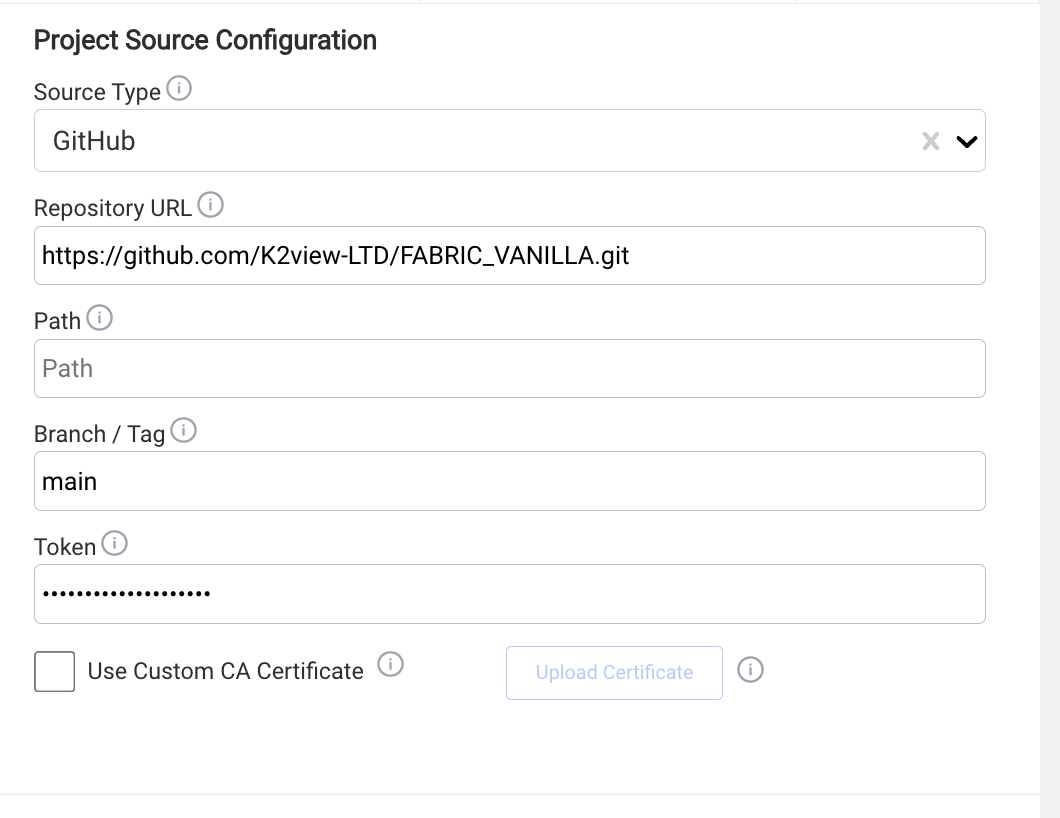
A K2cloud Project is associated with the Git repository containing the K2view project source.
The Project Git configuration allows K2cloud to read content from that repository when it is required for operations such as creating and deploying Spaces.
Git configuration in K2cloud does not replace the repository's own user and permission management.
Git Configuration
The Project requires:
- Repository URL — identifies the Git repository containing the K2view project.
- Git token — provides K2cloud with read access to the repository.
Repository URL
Enter the URL of the Git repository containing the K2view project.
For example:
https://github.com/company/customer360.git
Confirm that the repository exists and is accessible using the configured Git token.
Git Token
The Git token configured for the Project is used by K2cloud to read the repository.
The token must provide the repository access required by K2cloud, including access to the project source and the Git tags used during deployment.
The Project Git token should be treated as an operational credential and managed according to your organization's security policies.
K2cloud Git Access vs Developer Git Access
The Project Git token is not the credential used by developers working in Fabric Studio.
These are separate:
- K2cloud uses the Project Git token for read access required by K2cloud operations.
- Developers use their own Git credentials, such as a personal access token (PAT), when committing and pushing changes from Fabric Studio.
Developer access to the repository, including permissions to commit or push changes, is managed by the Git platform rather than by K2cloud.
This separation allows the Project to have a stable read credential without sharing developer credentials or using the Project token for individual development activity.
Configure Git During Project Creation
Git configuration can be provided when the Project is created.
- Enter the Repository URL.
- Enter the Git token.
- Complete the remaining Project configuration.
- Create the Project.
For the complete procedure, see Create a Project.
Update Git Configuration
To change the Git configuration for an existing Project:
- Open Projects.
- Select the Project.
- Open the Project configuration.
- Update the Git repository or token.
- Save the changes.
Validate Git Configuration
If K2cloud cannot access the repository, verify:
- the Repository URL is correct,
- the Git token is valid and has not expired,
- the token provides the required repository read access,
- the required Git tags are accessible,
- and repository access is not blocked by an enterprise Git policy.
A repository-access failure during Space creation or deployment may indicate a problem with the Project Git configuration.
Related Documentation
Configure Git
Overview
A K2cloud Project is associated with the Git repository containing the K2view project source.
The Project Git configuration allows K2cloud to read content from that repository when it is required for operations such as creating and deploying Spaces.
Git configuration in K2cloud does not replace the repository's own user and permission management.
Git Configuration
The Project requires:
- Repository URL — identifies the Git repository containing the K2view project.
- Git token — provides K2cloud with read access to the repository.
Repository URL
Enter the URL of the Git repository containing the K2view project.
For example:
https://github.com/company/customer360.git
Confirm that the repository exists and is accessible using the configured Git token.
Git Token
The Git token configured for the Project is used by K2cloud to read the repository.
The token must provide the repository access required by K2cloud, including access to the project source and the Git tags used during deployment.
The Project Git token should be treated as an operational credential and managed according to your organization's security policies.
K2cloud Git Access vs Developer Git Access
The Project Git token is not the credential used by developers working in Fabric Studio.
These are separate:
- K2cloud uses the Project Git token for read access required by K2cloud operations.
- Developers use their own Git credentials, such as a personal access token (PAT), when committing and pushing changes from Fabric Studio.
Developer access to the repository, including permissions to commit or push changes, is managed by the Git platform rather than by K2cloud.
This separation allows the Project to have a stable read credential without sharing developer credentials or using the Project token for individual development activity.
Configure Git During Project Creation
Git configuration can be provided when the Project is created.
- Enter the Repository URL.
- Enter the Git token.
- Complete the remaining Project configuration.
- Create the Project.
For the complete procedure, see Create a Project.
Update Git Configuration
To change the Git configuration for an existing Project:
- Open Projects.
- Select the Project.
- Open the Project configuration.
- Update the Git repository or token.
- Save the changes.
Validate Git Configuration
If K2cloud cannot access the repository, verify:
- the Repository URL is correct,
- the Git token is valid and has not expired,
- the token provides the required repository read access,
- the required Git tags are accessible,
- and repository access is not blocked by an enterprise Git policy.
A repository-access failure during Space creation or deployment may indicate a problem with the Project Git configuration.
Related Documentation
