


View Space Details
Overview
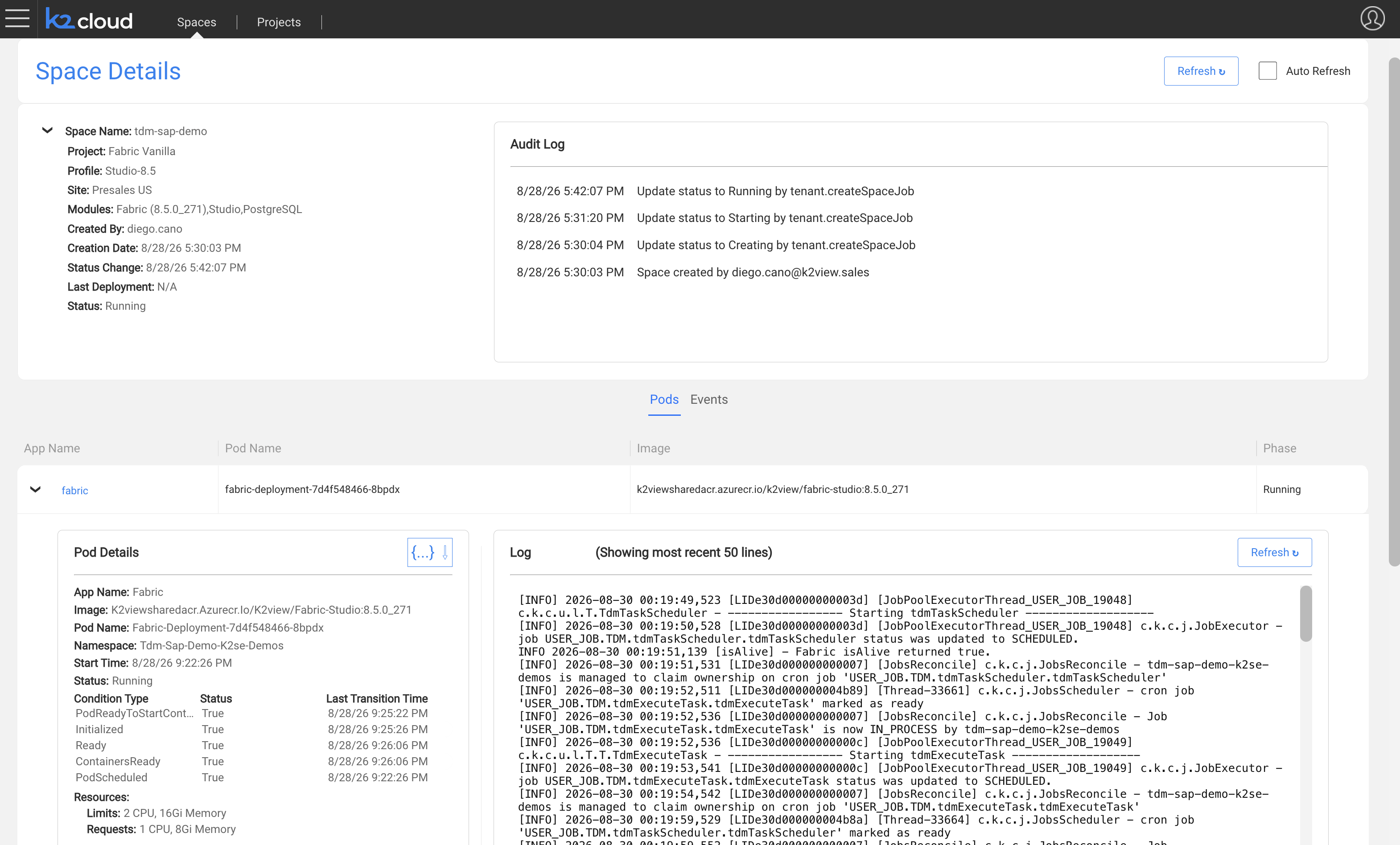
Space Details provides operational information about the Kubernetes resources associated with a Space.
Use Space Details to inspect the runtime state of the deployment and diagnose issues involving pods or Kubernetes events.
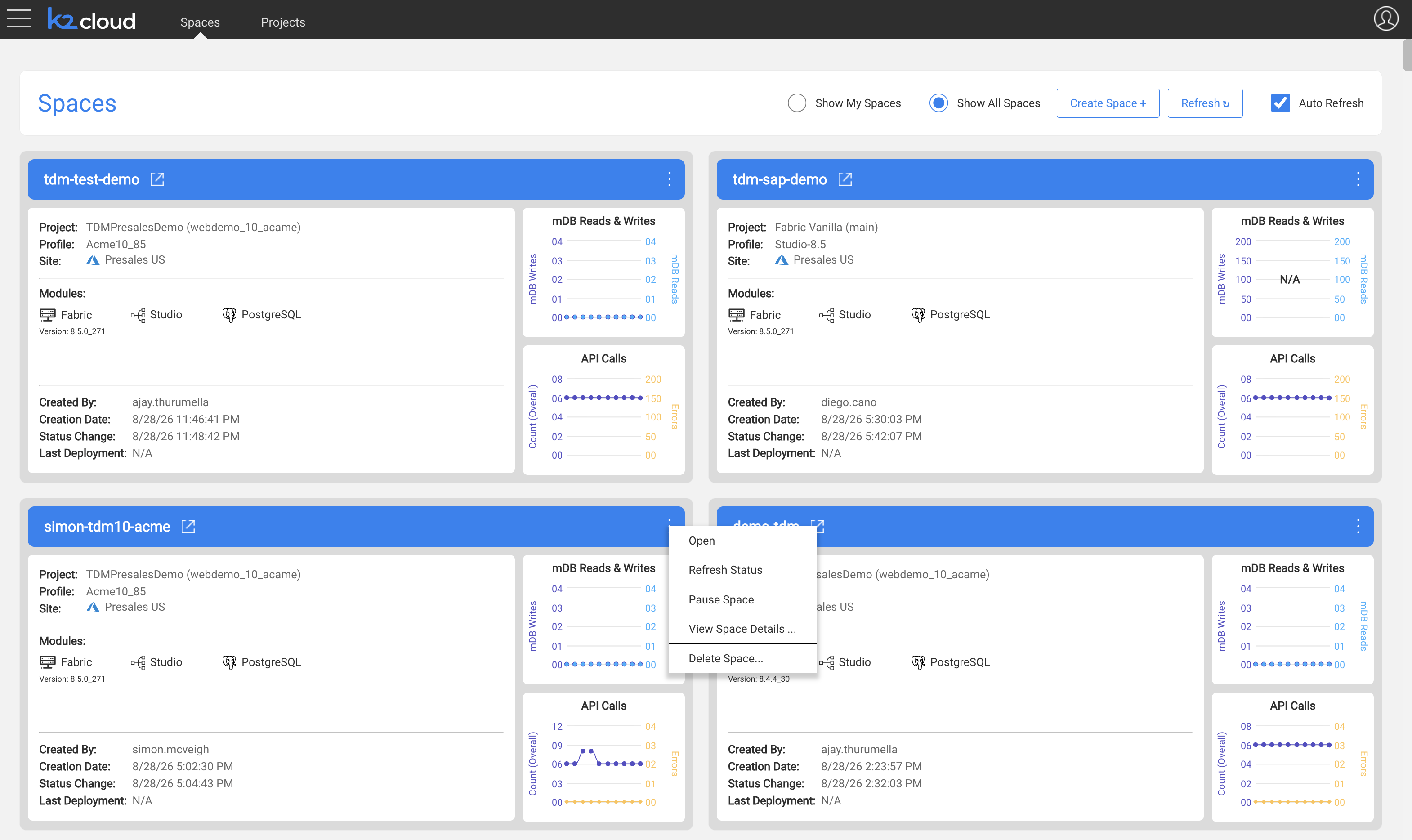
To open Space Details:
- Open the Spaces page.
- Locate the Space.
- Open the Space action menu (…).
- Select View Space Details.
Space Information
Space Details identifies the Space and its deployment configuration, including information such as:
- Project,
- Space Profile,
- Site,
- and current runtime state.
Pods
The Pods section shows the Kubernetes pods that make up the Space.
The pods shown depend on the type of Space and its Space Profile.
For example, a Studio Space can include pods supporting:
- Fabric Studio,
- Fabric,
- and PostgreSQL.
A Fabric Space using external persistence can contain only the Fabric runtime pods because the System Database and object storage are managed outside the Space.
Pod Details
Select a pod to view its Kubernetes runtime information.
Pod details can include:
- namespace,
- pod name,
- service,
- Kubernetes node,
- phase,
- IP address,
- start time,
- readiness,
- restart count,
- CPU usage,
- and memory usage.
This information can help determine whether a runtime component is operating normally or experiencing deployment or resource problems.
Pod Logs
Pod details provide access to the Kubernetes logs for the selected pod.
These logs are useful when diagnosing startup, deployment, connectivity, or runtime issues involving that component.
Pod logs in Space Details are Kubernetes diagnostics and are distinct from the K2cloud SaaS monitoring and log capabilities.
Pod Definition
The {...} action downloads the Kubernetes pod definition in JSON format.
This provides the underlying pod configuration for deeper troubleshooting or review.
Events
The Events section shows Kubernetes events associated with the Space.
Event information can include:
- reason,
- message,
- source,
- count,
- age,
- and event time.
Events are particularly useful when investigating provisioning, scheduling, image, restart, or other Kubernetes-level problems.
Using Space Details for Troubleshooting
When a Space is not operating as expected, Space Details provides a useful starting point.
A typical review is:
- Check the Space status.
- Review the pods and their current phase.
- Check pod readiness and restart counts.
- Review the relevant pod logs.
- Review Kubernetes Events for deployment or infrastructure errors.
- Download the pod definition if deeper configuration analysis is required.
Space Details provides deployment diagnostics; it is not a replacement for the broader monitoring and observability used to operate the environment.
Related Documentation
View Space Details
Overview
Space Details provides operational information about the Kubernetes resources associated with a Space.
Use Space Details to inspect the runtime state of the deployment and diagnose issues involving pods or Kubernetes events.
To open Space Details:
- Open the Spaces page.
- Locate the Space.
- Open the Space action menu (…).
- Select View Space Details.
Space Information
Space Details identifies the Space and its deployment configuration, including information such as:
- Project,
- Space Profile,
- Site,
- and current runtime state.
Pods
The Pods section shows the Kubernetes pods that make up the Space.
The pods shown depend on the type of Space and its Space Profile.
For example, a Studio Space can include pods supporting:
- Fabric Studio,
- Fabric,
- and PostgreSQL.
A Fabric Space using external persistence can contain only the Fabric runtime pods because the System Database and object storage are managed outside the Space.
Pod Details
Select a pod to view its Kubernetes runtime information.
Pod details can include:
- namespace,
- pod name,
- service,
- Kubernetes node,
- phase,
- IP address,
- start time,
- readiness,
- restart count,
- CPU usage,
- and memory usage.
This information can help determine whether a runtime component is operating normally or experiencing deployment or resource problems.
Pod Logs
Pod details provide access to the Kubernetes logs for the selected pod.
These logs are useful when diagnosing startup, deployment, connectivity, or runtime issues involving that component.
Pod logs in Space Details are Kubernetes diagnostics and are distinct from the K2cloud SaaS monitoring and log capabilities.
Pod Definition
The {...} action downloads the Kubernetes pod definition in JSON format.
This provides the underlying pod configuration for deeper troubleshooting or review.
Events
The Events section shows Kubernetes events associated with the Space.
Event information can include:
- reason,
- message,
- source,
- count,
- age,
- and event time.
Events are particularly useful when investigating provisioning, scheduling, image, restart, or other Kubernetes-level problems.
Using Space Details for Troubleshooting
When a Space is not operating as expected, Space Details provides a useful starting point.
A typical review is:
- Check the Space status.
- Review the pods and their current phase.
- Check pod readiness and restart counts.
- Review the relevant pod logs.
- Review Kubernetes Events for deployment or infrastructure errors.
- Download the pod definition if deeper configuration analysis is required.
Space Details provides deployment diagnostics; it is not a replacement for the broader monitoring and observability used to operate the environment.
Related Documentation
