


TDM Agent Architecture
The TDM Agent runs entirely inside the customer's K2view Fabric deployment, beside TDM, on the AI Fusion agent runtime. It only prepares TDM task executions — a person always reviews and runs them. This article describes how the agent is built on top of Fabric and AI Fusion, and how a request flows through it.
For the data sent to the LLM and the security controls, see TDM Agent Security and Privacy.
Core Control Principle: It Prepares, It Never Executes
Every data movement therefore still passes through TDM's existing task permissions, environment permissions and execution controls.
This principle applies to the TDM Agent in chat and through the REST API. The TDM MCP tools are a separate channel: an MCP client can also start a task execution with the StartTaskExecution tool, under the same TDM permissions and execution validations.
Components
The TDM Agent is a set of AI Fusion agents and Broadway tool flows deployed on the customer's own K2view Fabric, beside TDM. It adds no new external service. The only outbound call is to the LLM provider the customer configures.
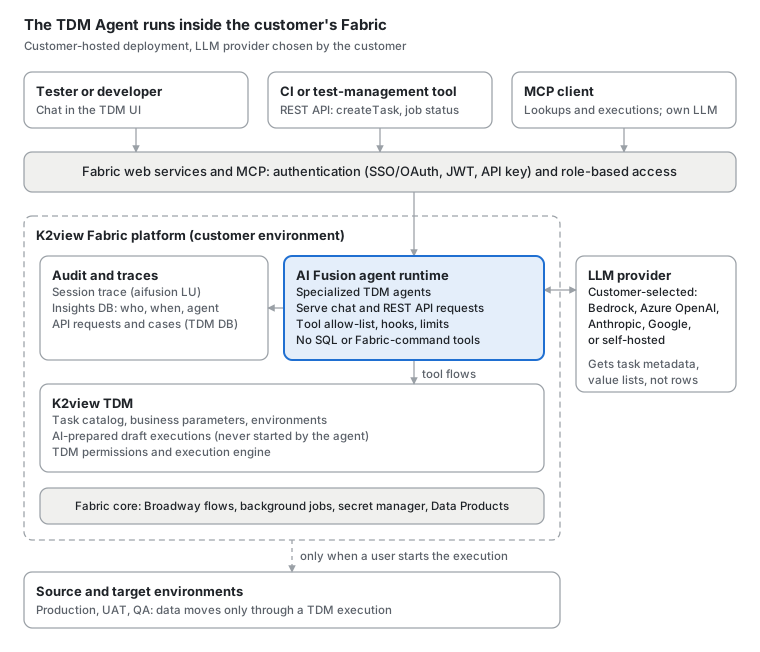
Requests enter only through authenticated Fabric web services and MCP. The agents reach TDM only through allow-listed tool flows. Data moves between environments only through a TDM execution: started by a person from the prepared draft, or by an MCP client through the StartTaskExecution tool.
Agentic Flow
Each chat or REST API request passes through a fixed chain of specialized agents. A trusted hook sets the scope, the LLM works only through allow-listed tools, and the run always ends at a draft that a person must start.
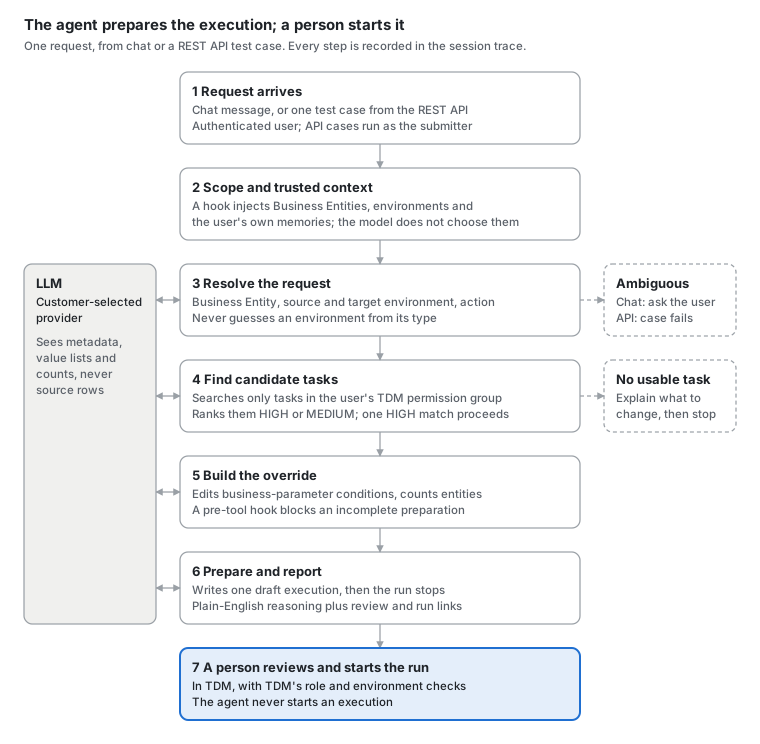
In chat, when several good matches exist, they are shown to the user to choose from. Through the REST API, each test case runs as its own audited session and never asks questions. It ends READY with a review link, or FAILED with the agent's reasoning.
Related Articles


TDM Agent Architecture
The TDM Agent runs entirely inside the customer's K2view Fabric deployment, beside TDM, on the AI Fusion agent runtime. It only prepares TDM task executions — a person always reviews and runs them. This article describes how the agent is built on top of Fabric and AI Fusion, and how a request flows through it.
For the data sent to the LLM and the security controls, see TDM Agent Security and Privacy.
Core Control Principle: It Prepares, It Never Executes
Every data movement therefore still passes through TDM's existing task permissions, environment permissions and execution controls.
This principle applies to the TDM Agent in chat and through the REST API. The TDM MCP tools are a separate channel: an MCP client can also start a task execution with the StartTaskExecution tool, under the same TDM permissions and execution validations.
Components
The TDM Agent is a set of AI Fusion agents and Broadway tool flows deployed on the customer's own K2view Fabric, beside TDM. It adds no new external service. The only outbound call is to the LLM provider the customer configures.
Requests enter only through authenticated Fabric web services and MCP. The agents reach TDM only through allow-listed tool flows. Data moves between environments only through a TDM execution: started by a person from the prepared draft, or by an MCP client through the StartTaskExecution tool.
Agentic Flow
Each chat or REST API request passes through a fixed chain of specialized agents. A trusted hook sets the scope, the LLM works only through allow-listed tools, and the run always ends at a draft that a person must start.
In chat, when several good matches exist, they are shown to the user to choose from. Through the REST API, each test case runs as its own audited session and never asks questions. It ends READY with a review link, or FAILED with the agent's reasoning.
Related Articles
