


Table-Level Implementation - Customized Execution Flows
A customized Broadway flow can be added to a table's extract, load, delete processes or in-place masking processes. The implementor can apply it to all activities, or only to specific ones. Using this feature, you can access the following capabilities:
- Custom masking for selected fields (not Catalog-based).
- Extracting or loading large volumes of data that require using third-party tools, such as DB2move.
- Impacting the table execution order or table count.
- Custom logic for in-place masking.
Table-Level Customized Flows — Implementation Guidelines
The customized flows must be added under the Shared Objects in the Project tree.
Extract Flow
- The extract flow receives a list of input parameters from the TDM execution processes and returns both the number of records in the table and an array of result objects. To implement the extract template and customize the extraction logic, duplicate the GetSourceDataByQuery flow (located in the TDM_TableLevel LU).
- Note that the generic/custom extract flow is executed only for tables without partitions (i.e., tables with a single partition). For partitioned tables, you must define a custom flow that retrieves records per partition in order to apply customized extraction logic.
Customized Masking Logic
The Catalog Masking Actor is invoked after the extract flow execution.
Setting customized masking logic on tables:
- If you need to set customized logic on specific fields, edit the Catalog and remove the PII property from these fields in the Catalog as a way to prevent double-masking them.
- Sometimes, the customized masking logic is based on the Catalog masking output, e.g., building the masked email address based on the masked first and last names. If you need to call the Catalog Masking Actor in the extract flow, proceed as follows:
- Add the CatalogMaskingMapper Actor to the extract flow.
- Add customized Masking Actors to the extract flow to be invoked after the CatalogMaskingMapper Actor.
- Set the enable_masking parameter to false at the end of the extract flow as a way to prevent double-masking of the table's record by the TDM execution processes.
Customized Extract Flow — Example
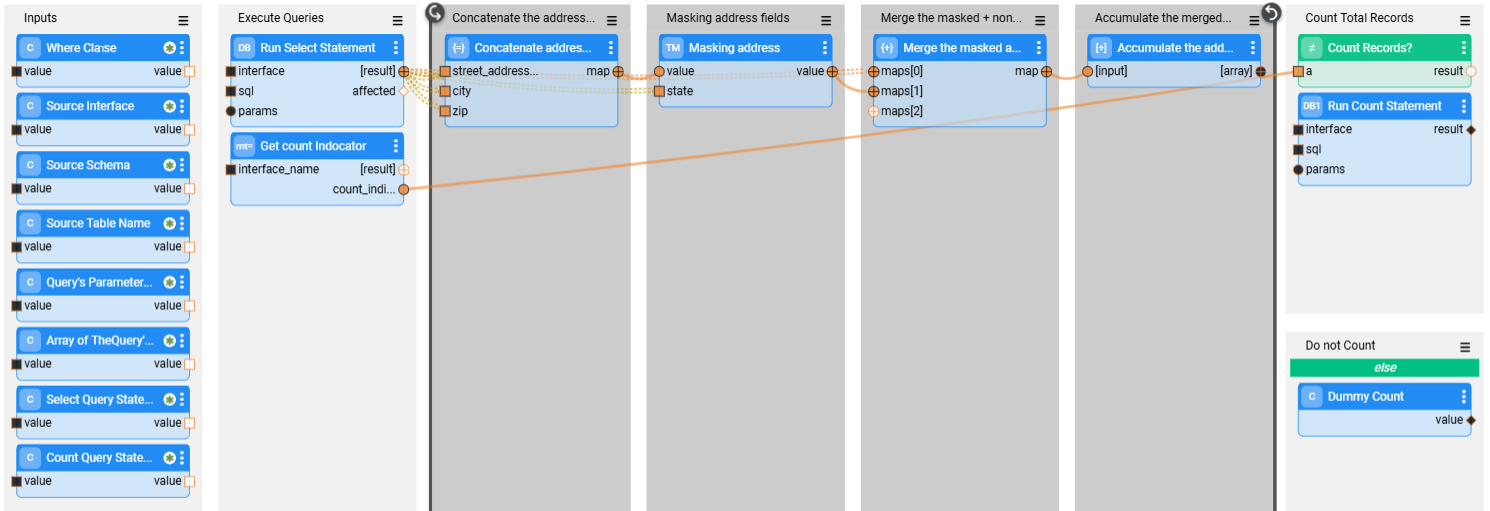
The image below depicts an example that executes the following actions:
- Selecting records from the address table.
- Opening a loop on the extracted records.
- On each record -
- Masking the street, city, and zip code fields.
- Merging the masked fields into the address record.
- Accumulating the merged record with the masked fields into an array. The accumulated array is the external result field of the flow.
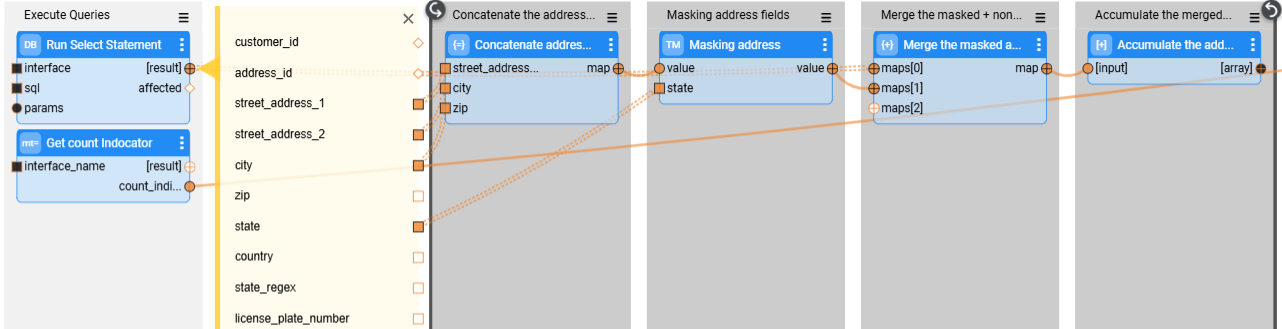
See the loop on the selected address records:
Load Flow
- The load flow receives a list of input parameters from the TDM execution processes and returns the number of loaded records. Duplicate the LoadTableByQuery flow (located in the TDM_TableLevel LU) in order to implement the load template and customize the load logic.
- Note that if you use Fabric V8.1.6 and above, you must manually add the
__active_environmentinput parameterto the DbCommand and/or DbLoad Actors; set this parameter as Const and populate it with any value (e.g., target). Adding the__active_environmentinput parameter enables refreshing the environment, updating it to be the target environment in the load flow, and running the load in the target environment. This parameter is already included in the duplicated LoadTableByQuery flow (DbLoad Actor).
Load Flow - Error Handler
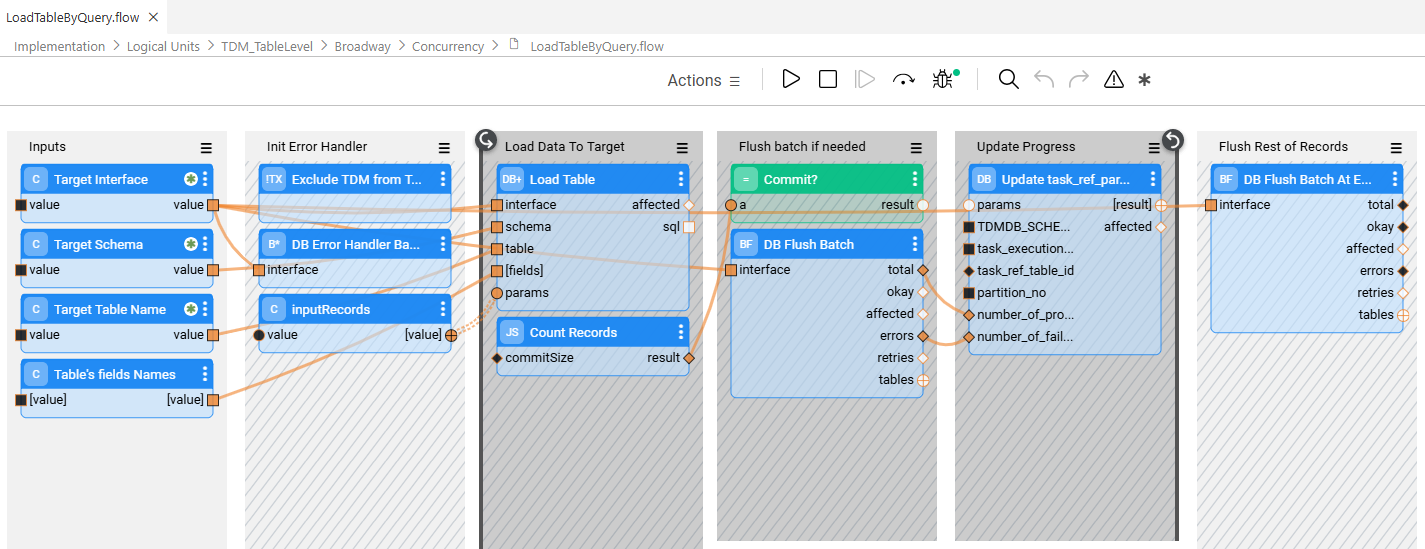
Starting with TDM 9.5, the DbErrorHandlerBatch and DbFlushBatch Actors are added to the LoadTableByQuery flow. These Actors provide enhanced batch-level error handling and enable task execution to ignore predefined database errors—such as unique constraint violations—while continuing to process subsequent records without interruption. In addition, successfully processed records are committed to the target database even when some records fail, preventing a full task rollback due to partial errors.
TDM flows use a custom version on these Actors:
- TDMDbErrorHandlerBatch
- TDMDbFlushBatch
These custom actors have the __active_environment input parameter populated with the value target.
Similar to the DbCommand and DbLoad actors, setting the __active_environment parameter refreshes the environment, switches it to the target environment within the load flow, and ensures the load operation runs against the target database.
Within the LoadTableByQuery flow, the TDMDbErrorHandlerBatch actor suppresses unique constraint errors and reports them to the TDM database using the PopulatePartitionTableErrorsOnly inner flow.
Add a TDMDbErrorHandlerBatch actor for each interface and populate the __active_environment input parameter with target to include error handling in a customized load flow, The actor must be included in the same transaction as the DbLoad or DbCommand actor.
See the example below:
- Note:
- In databases that automatically abort a transaction when an error occurs (for example, PostgreSQL), further processing within the same transaction is not possible. As a result, the affected table partition is not loaded.
Delete Flow
- The delete flow receives a list of input parameters from the TDM execution processes and deletes the table before the load. Duplicate the DeleteTableByDBCommand flow (located in the TDM_TableLevel LU) to implement the delete template and customize the delete logic.
Customized Flows — TableLevelDefinitions Fields
The following TableLevelDefinitions fields should be populated for each record:
interface_name — The interface name defined in the TDM project implementation.
schema_name — The DB schema. Can be populated with either of the following options:
- Schema name
- Starting with TDM V9.4 onwards, the schema name can also be populated with the Global name. Add a
@sign before and after the Global name to indicate that the schema name should be taken from the Global's value. For example:@CUSTOMER_SCHEMA_NAME@. Using a Global to populate the schema is useful when different environments have different schema names.
table_name — Populated with the table name. If this setting is empty, the customized flows will run on all the tables in the interface and schema.
count_indicator— By default the count indicator is true, enabling counting the number of records in the source or target, as a way to monitor task execution. Set this indicator to false, if required, to disable counting records in the target.
record_count_flow — Populated with the name of a customized flow that returns the table record count. The flow must expose a single external output parameter named tableCount.
table_order — A numeric value or a flow name that defines the table’s execution priority. The table order specified in the TableLevelDefinitions MTable has the highest priority and can override the PK/FK relationships between task tables. If any table in a task has a table order defined in this MTable, then all tables in the task must have a table order defined as well. The TDM execution follows PK/FK relationships only when none of the task’s tables has a table order defined.
extract_flow — Populated with the customized extract flow name.
delete_flow — Populated with the customized delete flow name.
load_flow — Populated with the load flow name.
Table-Level Implementation - Customized Execution Flows
A customized Broadway flow can be added to a table's extract, load, delete processes or in-place masking processes. The implementor can apply it to all activities, or only to specific ones. Using this feature, you can access the following capabilities:
- Custom masking for selected fields (not Catalog-based).
- Extracting or loading large volumes of data that require using third-party tools, such as DB2move.
- Impacting the table execution order or table count.
- Custom logic for in-place masking.
Table-Level Customized Flows — Implementation Guidelines
The customized flows must be added under the Shared Objects in the Project tree.
Extract Flow
- The extract flow receives a list of input parameters from the TDM execution processes and returns both the number of records in the table and an array of result objects. To implement the extract template and customize the extraction logic, duplicate the GetSourceDataByQuery flow (located in the TDM_TableLevel LU).
- Note that the generic/custom extract flow is executed only for tables without partitions (i.e., tables with a single partition). For partitioned tables, you must define a custom flow that retrieves records per partition in order to apply customized extraction logic.
Customized Masking Logic
The Catalog Masking Actor is invoked after the extract flow execution.
Setting customized masking logic on tables:
- If you need to set customized logic on specific fields, edit the Catalog and remove the PII property from these fields in the Catalog as a way to prevent double-masking them.
- Sometimes, the customized masking logic is based on the Catalog masking output, e.g., building the masked email address based on the masked first and last names. If you need to call the Catalog Masking Actor in the extract flow, proceed as follows:
- Add the CatalogMaskingMapper Actor to the extract flow.
- Add customized Masking Actors to the extract flow to be invoked after the CatalogMaskingMapper Actor.
- Set the enable_masking parameter to false at the end of the extract flow as a way to prevent double-masking of the table's record by the TDM execution processes.
Customized Extract Flow — Example
The image below depicts an example that executes the following actions:
- Selecting records from the address table.
- Opening a loop on the extracted records.
- On each record -
- Masking the street, city, and zip code fields.
- Merging the masked fields into the address record.
- Accumulating the merged record with the masked fields into an array. The accumulated array is the external result field of the flow.
See the loop on the selected address records:
Load Flow
- The load flow receives a list of input parameters from the TDM execution processes and returns the number of loaded records. Duplicate the LoadTableByQuery flow (located in the TDM_TableLevel LU) in order to implement the load template and customize the load logic.
- Note that if you use Fabric V8.1.6 and above, you must manually add the
__active_environmentinput parameterto the DbCommand and/or DbLoad Actors; set this parameter as Const and populate it with any value (e.g., target). Adding the__active_environmentinput parameter enables refreshing the environment, updating it to be the target environment in the load flow, and running the load in the target environment. This parameter is already included in the duplicated LoadTableByQuery flow (DbLoad Actor).
Load Flow - Error Handler
Starting with TDM 9.5, the DbErrorHandlerBatch and DbFlushBatch Actors are added to the LoadTableByQuery flow. These Actors provide enhanced batch-level error handling and enable task execution to ignore predefined database errors—such as unique constraint violations—while continuing to process subsequent records without interruption. In addition, successfully processed records are committed to the target database even when some records fail, preventing a full task rollback due to partial errors.
TDM flows use a custom version on these Actors:
- TDMDbErrorHandlerBatch
- TDMDbFlushBatch
These custom actors have the __active_environment input parameter populated with the value target.
Similar to the DbCommand and DbLoad actors, setting the __active_environment parameter refreshes the environment, switches it to the target environment within the load flow, and ensures the load operation runs against the target database.
Within the LoadTableByQuery flow, the TDMDbErrorHandlerBatch actor suppresses unique constraint errors and reports them to the TDM database using the PopulatePartitionTableErrorsOnly inner flow.
Add a TDMDbErrorHandlerBatch actor for each interface and populate the __active_environment input parameter with target to include error handling in a customized load flow, The actor must be included in the same transaction as the DbLoad or DbCommand actor.
See the example below:
- Note:
- In databases that automatically abort a transaction when an error occurs (for example, PostgreSQL), further processing within the same transaction is not possible. As a result, the affected table partition is not loaded.
Delete Flow
- The delete flow receives a list of input parameters from the TDM execution processes and deletes the table before the load. Duplicate the DeleteTableByDBCommand flow (located in the TDM_TableLevel LU) to implement the delete template and customize the delete logic.
Customized Flows — TableLevelDefinitions Fields
The following TableLevelDefinitions fields should be populated for each record:
interface_name — The interface name defined in the TDM project implementation.
schema_name — The DB schema. Can be populated with either of the following options:
- Schema name
- Starting with TDM V9.4 onwards, the schema name can also be populated with the Global name. Add a
@sign before and after the Global name to indicate that the schema name should be taken from the Global's value. For example:@CUSTOMER_SCHEMA_NAME@. Using a Global to populate the schema is useful when different environments have different schema names.
table_name — Populated with the table name. If this setting is empty, the customized flows will run on all the tables in the interface and schema.
count_indicator— By default the count indicator is true, enabling counting the number of records in the source or target, as a way to monitor task execution. Set this indicator to false, if required, to disable counting records in the target.
record_count_flow — Populated with the name of a customized flow that returns the table record count. The flow must expose a single external output parameter named tableCount.
table_order — A numeric value or a flow name that defines the table’s execution priority. The table order specified in the TableLevelDefinitions MTable has the highest priority and can override the PK/FK relationships between task tables. If any table in a task has a table order defined in this MTable, then all tables in the task must have a table order defined as well. The TDM execution follows PK/FK relationships only when none of the task’s tables has a table order defined.
extract_flow — Populated with the customized extract flow name.
delete_flow — Populated with the customized delete flow name.
load_flow — Populated with the load flow name.
