


Project Overview
Overview
A Project represents a K2view implementation managed through K2cloud.
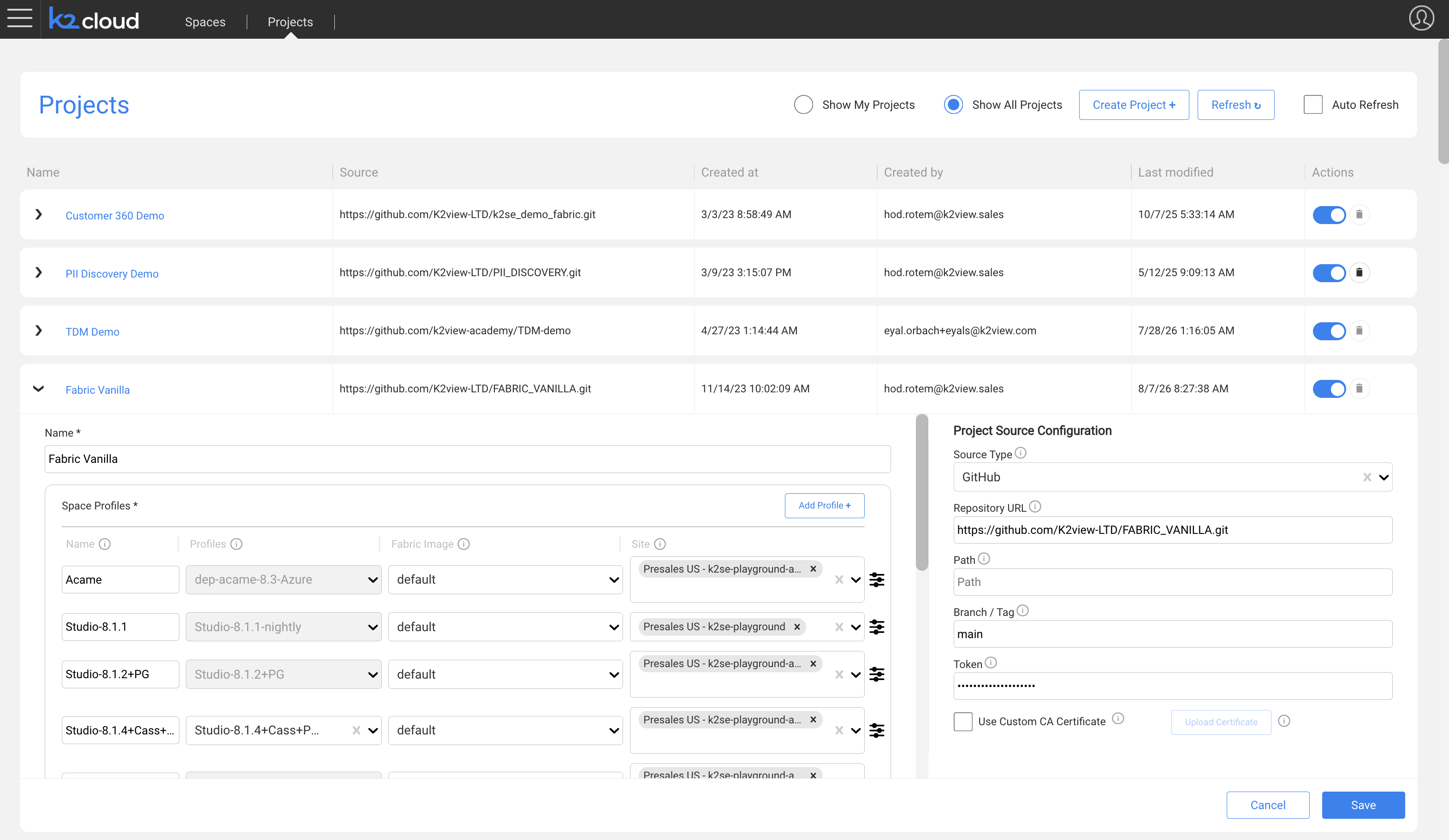
The Project provides the common configuration used to create and operate Spaces for that implementation. It associates the implementation with its Git repository and defines the Space Profiles available when creating Spaces.
A single Project can have multiple Spaces representing development, QA, staging, production, or other environments.
What a Project Defines
A Project commonly defines:
- the Project name,
- Git repository configuration,
- the Space Profiles available to the Project,
- the Fabric Image selected for each Space Profile,
- and Project-level configuration used when creating and operating Spaces.
The Project itself does not create runtime infrastructure. A runtime environment is provisioned when a Space is created.
Projects and Git
A Project is associated with the Git repository containing the K2view project source.
K2cloud uses the Project's Git configuration when source content is required for Space creation and deployment operations.
The Git token configured for the Project provides K2cloud with read access to the repository. It is not used as the Git credential for individual developers.
Developers working in Fabric Studio use their own Git credentials, such as a personal access token (PAT), for operations such as commits and pushes. Developer repository permissions are managed by the Git platform.
For more information, see Configure Git.
Projects and Space Profiles
A Project can have one or more Space Profiles.
The Space Profile defines the runtime topology and resources used when a Space is created. Different profiles can therefore be made available for different types of Spaces.
For example, the same Project may provide:
- a Studio profile for development,
- and one or more Fabric runtime profiles for staging or production.
The Fabric Image associated with each Space Profile determines the Fabric version used by Spaces created with that profile.
For more information, see Space Profiles.
Projects and Spaces
A Project can have multiple Spaces.
When creating a Space, the Project Manager combines the Project with the appropriate Space Profile, Fabric Image, and Site:
Project + Space Profile + Fabric Image + Site → Space
This allows the same implementation to be deployed into multiple environments without creating a separate Project for each environment.
The Site is selected when the Space is created and determines where that particular Space is deployed.
For more information, see Spaces.
When to Create a New Project
Create a new Project when a distinct K2view implementation boundary is required.
For example, a separate Project may be appropriate for:
- a different K2view implementation,
- a separate Git repository,
- or an implementation that needs to be managed independently from existing Projects.
Development, QA, staging, and production environments for the same implementation would normally be represented by separate Spaces within the same Project, rather than separate Projects.
Related Documentation
Project Overview
Overview
A Project represents a K2view implementation managed through K2cloud.
The Project provides the common configuration used to create and operate Spaces for that implementation. It associates the implementation with its Git repository and defines the Space Profiles available when creating Spaces.
A single Project can have multiple Spaces representing development, QA, staging, production, or other environments.
What a Project Defines
A Project commonly defines:
- the Project name,
- Git repository configuration,
- the Space Profiles available to the Project,
- the Fabric Image selected for each Space Profile,
- and Project-level configuration used when creating and operating Spaces.
The Project itself does not create runtime infrastructure. A runtime environment is provisioned when a Space is created.
Projects and Git
A Project is associated with the Git repository containing the K2view project source.
K2cloud uses the Project's Git configuration when source content is required for Space creation and deployment operations.
The Git token configured for the Project provides K2cloud with read access to the repository. It is not used as the Git credential for individual developers.
Developers working in Fabric Studio use their own Git credentials, such as a personal access token (PAT), for operations such as commits and pushes. Developer repository permissions are managed by the Git platform.
For more information, see Configure Git.
Projects and Space Profiles
A Project can have one or more Space Profiles.
The Space Profile defines the runtime topology and resources used when a Space is created. Different profiles can therefore be made available for different types of Spaces.
For example, the same Project may provide:
- a Studio profile for development,
- and one or more Fabric runtime profiles for staging or production.
The Fabric Image associated with each Space Profile determines the Fabric version used by Spaces created with that profile.
For more information, see Space Profiles.
Projects and Spaces
A Project can have multiple Spaces.
When creating a Space, the Project Manager combines the Project with the appropriate Space Profile, Fabric Image, and Site:
Project + Space Profile + Fabric Image + Site → Space
This allows the same implementation to be deployed into multiple environments without creating a separate Project for each environment.
The Site is selected when the Space is created and determines where that particular Space is deployed.
For more information, see Spaces.
When to Create a New Project
Create a new Project when a distinct K2view implementation boundary is required.
For example, a separate Project may be appropriate for:
- a different K2view implementation,
- a separate Git repository,
- or an implementation that needs to be managed independently from existing Projects.
Development, QA, staging, and production environments for the same implementation would normally be represented by separate Spaces within the same Project, rather than separate Projects.
Related Documentation
