


Fabric Configuration Settings
Overview
The Fabric Configuration settings of a Space Profile allow Fabric runtime configuration to be defined as part of the profile.
These settings are applied when K2cloud deploys Spaces using the profile, providing a consistent runtime configuration across Spaces that use the same deployment pattern.
Use these settings for Fabric configuration that should be established as part of the Space deployment rather than configured separately after the Space is created.
Open Fabric Configuration Settings
To view or modify the Fabric Configuration settings:
- Open the K2cloud Orchestrator.
- Open Projects.
- Locate the Project and Space Profile.
- Open the Space Profile Advanced Settings.
- Select the Fabric Configuration tab.
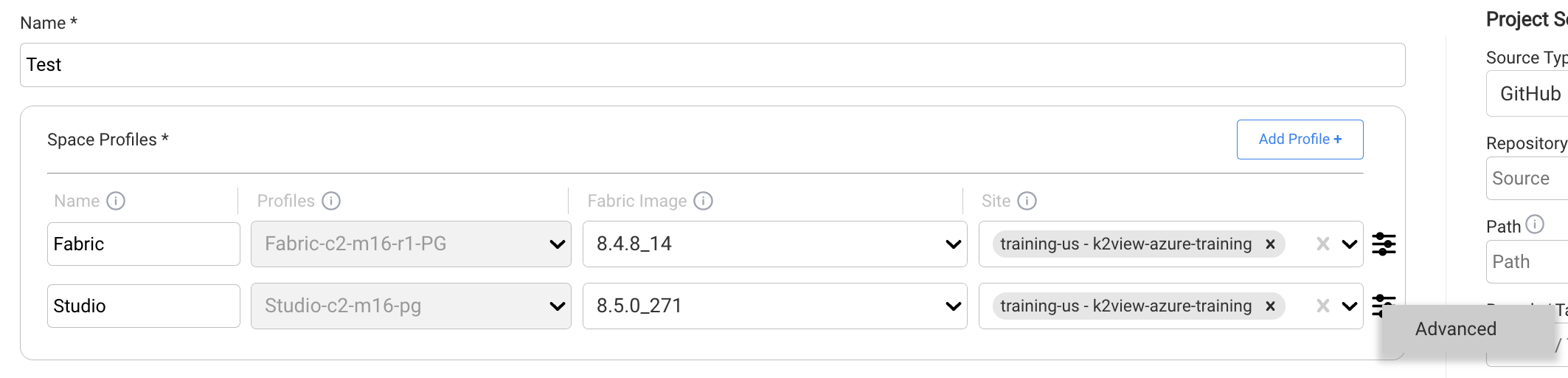
Configuration Properties
Fabric configuration is defined using configuration properties associated with the Space Profile.
Each property identifies a Fabric configuration setting and its configured value.
The available properties depend on the Fabric configuration requirements of the deployment.
Profile-Level Configuration
Configuration defined in the Space Profile becomes part of the deployment definition for Spaces using that profile.
This is useful when the same Fabric runtime configuration should be applied consistently across Spaces using a common deployment pattern.
Keep configuration in the Space Profile focused on settings that are appropriate for the profile and its intended runtime topology.
Environment-specific application configuration should remain separate from the Space Profile where appropriate.
Changing Fabric Configuration
Changes to Fabric Configuration settings should be reviewed carefully when the Space Profile is already in use.
A profile may be associated with multiple Spaces, and changes to the profile can affect subsequent lifecycle operations involving those Spaces.
Before changing a setting:
- understand the purpose of the Fabric configuration property,
- determine whether the change is appropriate for all Spaces using the profile,
- and validate the change in a non-production environment where appropriate.
Save Changes
After modifying the Fabric Configuration settings:
- Review the changed properties.
- Save the Space Profile.
- Validate the resulting Fabric configuration as appropriate for the affected environment.
Related Documentation
Fabric Configuration Settings
Overview
The Fabric Configuration settings of a Space Profile allow Fabric runtime configuration to be defined as part of the profile.
These settings are applied when K2cloud deploys Spaces using the profile, providing a consistent runtime configuration across Spaces that use the same deployment pattern.
Use these settings for Fabric configuration that should be established as part of the Space deployment rather than configured separately after the Space is created.
Open Fabric Configuration Settings
To view or modify the Fabric Configuration settings:
- Open the K2cloud Orchestrator.
- Open Projects.
- Locate the Project and Space Profile.
- Open the Space Profile Advanced Settings.
- Select the Fabric Configuration tab.
Configuration Properties
Fabric configuration is defined using configuration properties associated with the Space Profile.
Each property identifies a Fabric configuration setting and its configured value.
The available properties depend on the Fabric configuration requirements of the deployment.
Profile-Level Configuration
Configuration defined in the Space Profile becomes part of the deployment definition for Spaces using that profile.
This is useful when the same Fabric runtime configuration should be applied consistently across Spaces using a common deployment pattern.
Keep configuration in the Space Profile focused on settings that are appropriate for the profile and its intended runtime topology.
Environment-specific application configuration should remain separate from the Space Profile where appropriate.
Changing Fabric Configuration
Changes to Fabric Configuration settings should be reviewed carefully when the Space Profile is already in use.
A profile may be associated with multiple Spaces, and changes to the profile can affect subsequent lifecycle operations involving those Spaces.
Before changing a setting:
- understand the purpose of the Fabric configuration property,
- determine whether the change is appropriate for all Spaces using the profile,
- and validate the change in a non-production environment where appropriate.
Save Changes
After modifying the Fabric Configuration settings:
- Review the changed properties.
- Save the Space Profile.
- Validate the resulting Fabric configuration as appropriate for the affected environment.
Related Documentation
