


Space Profiles Overview
Overview
A Space Profile defines how a Space is deployed and the runtime resources and services available to it.
Space Profiles provide reusable deployment definitions rather than requiring the deployment topology to be configured separately for every Space.
A profile can define characteristics such as:
- Space type,
- CPU and memory resources,
- number of Fabric replicas,
- supporting services,
- System Database configuration,
- ingress behavior,
- runtime configuration,
- and other deployment settings.
K2view typically recommends and provisions the initial Space Profiles based on the intended use of the K2cloud environment.
For the available K2cloud profiles, see K2cloud Versionless Space Profiles.
Space Profiles and Spaces
A Space is created using a Project, Space Profile, Fabric Image, and Site:
Project + Space Profile + Fabric Image + Site → Space
Each has a distinct purpose:
This separation allows the runtime topology, software version, and deployment location to be managed independently.
What a Space Profile Defines
The settings available in a Space Profile depend on the type of profile and the K2cloud deployment.
A profile can define:
- CPU and memory allocation,
- Fabric replica count,
- supporting runtime services,
- System Database configuration,
- ingress configuration,
- Fabric configuration settings,
- non-Fabric image settings,
- and advanced deployment configuration.
The selected profile therefore determines much of the topology and operational behavior of the resulting Space.
Studio and Fabric Profiles
Space Profiles can support different types of K2view environments.
A Studio profile typically provisions the services required for a development environment, including:
- Fabric,
- Fabric Studio,
- and PostgreSQL.
A Fabric runtime profile provisions the Fabric runtime topology required for the environment. Depending on the profile, this can include multiple Fabric replicas and externalized services such as the System Database.
For example, commonly used profiles include:
Studio-c2-m16-pgFabric-c4-m32-r3-noSdB
The appropriate profile depends on the purpose, workload, and operational requirements of the Space.
Space Profiles and Fabric Images
The Space Profile and Fabric Image serve different purposes.
The Space Profile defines the deployment topology and resources.
The Fabric Image defines the version of Fabric or Studio deployed within that topology.
Keeping these separate allows a Project Manager to change the Fabric version associated with a profile without creating a new profile simply because the software version has changed.
For more information, see Fabric Image Versions.
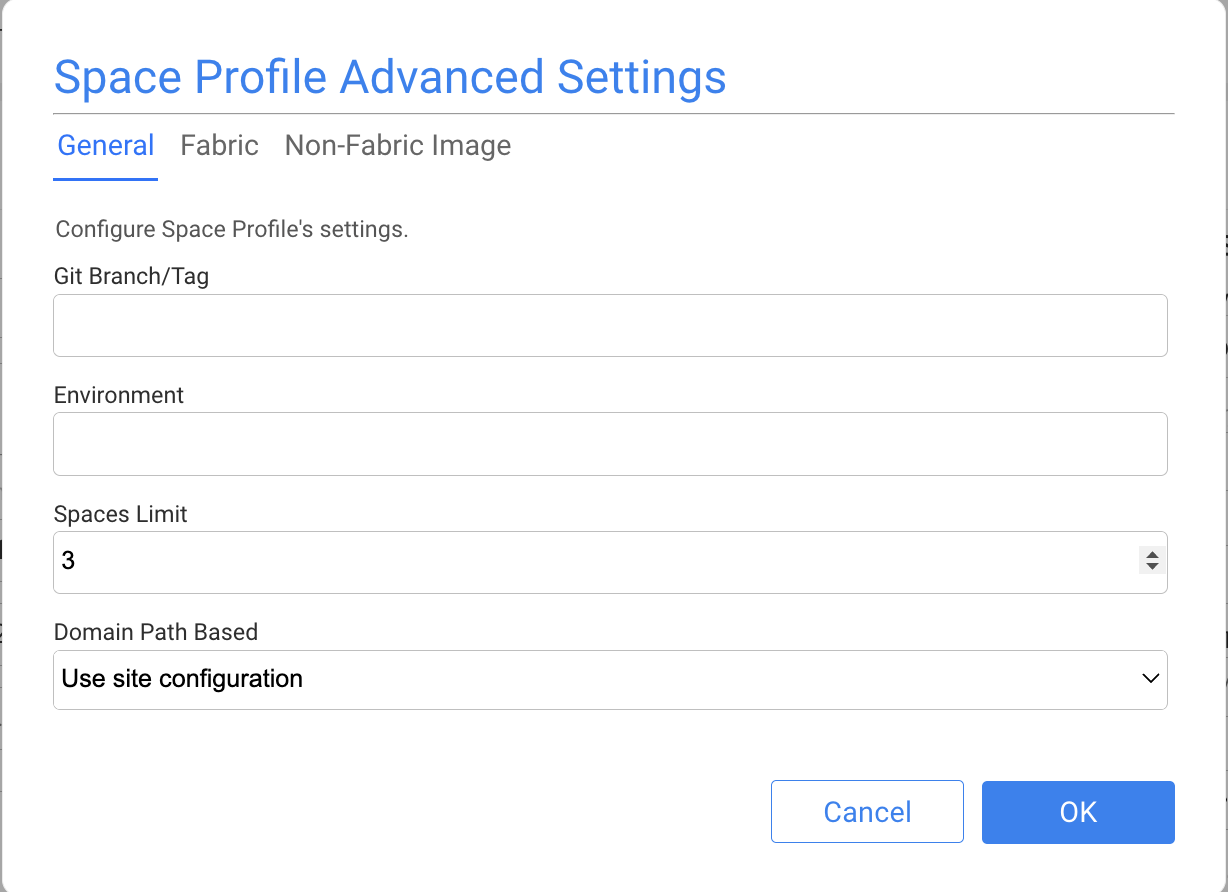
Space Profile Configuration
Space Profile configuration is organized into several areas:
- General Settings — general deployment characteristics of the profile.
- Fabric Configuration Settings — configuration applied to the Fabric runtime.
- Non-Fabric Image Configuration Settings — configuration for supporting container images and services.
The available settings depend on the profile and deployment environment.
Using a Space Profile
Space Profiles associated with a Project become available when creating a Space.
The Project Manager selects the appropriate profile and Site, and K2cloud uses the profile configuration and its selected Fabric Image to provision the Space.
Related Documentation
Space Profiles Overview
Overview
A Space Profile defines how a Space is deployed and the runtime resources and services available to it.
Space Profiles provide reusable deployment definitions rather than requiring the deployment topology to be configured separately for every Space.
A profile can define characteristics such as:
- Space type,
- CPU and memory resources,
- number of Fabric replicas,
- supporting services,
- System Database configuration,
- ingress behavior,
- runtime configuration,
- and other deployment settings.
K2view typically recommends and provisions the initial Space Profiles based on the intended use of the K2cloud environment.
For the available K2cloud profiles, see K2cloud Versionless Space Profiles.
Space Profiles and Spaces
A Space is created using a Project, Space Profile, Fabric Image, and Site:
Project + Space Profile + Fabric Image + Site → Space
Each has a distinct purpose:
This separation allows the runtime topology, software version, and deployment location to be managed independently.
What a Space Profile Defines
The settings available in a Space Profile depend on the type of profile and the K2cloud deployment.
A profile can define:
- CPU and memory allocation,
- Fabric replica count,
- supporting runtime services,
- System Database configuration,
- ingress configuration,
- Fabric configuration settings,
- non-Fabric image settings,
- and advanced deployment configuration.
The selected profile therefore determines much of the topology and operational behavior of the resulting Space.
Studio and Fabric Profiles
Space Profiles can support different types of K2view environments.
A Studio profile typically provisions the services required for a development environment, including:
- Fabric,
- Fabric Studio,
- and PostgreSQL.
A Fabric runtime profile provisions the Fabric runtime topology required for the environment. Depending on the profile, this can include multiple Fabric replicas and externalized services such as the System Database.
For example, commonly used profiles include:
Studio-c2-m16-pgFabric-c4-m32-r3-noSdB
The appropriate profile depends on the purpose, workload, and operational requirements of the Space.
Space Profiles and Fabric Images
The Space Profile and Fabric Image serve different purposes.
The Space Profile defines the deployment topology and resources.
The Fabric Image defines the version of Fabric or Studio deployed within that topology.
Keeping these separate allows a Project Manager to change the Fabric version associated with a profile without creating a new profile simply because the software version has changed.
For more information, see Fabric Image Versions.
Space Profile Configuration
Space Profile configuration is organized into several areas:
- General Settings — general deployment characteristics of the profile.
- Fabric Configuration Settings — configuration applied to the Fabric runtime.
- Non-Fabric Image Configuration Settings — configuration for supporting container images and services.
The available settings depend on the profile and deployment environment.
Using a Space Profile
Space Profiles associated with a Project become available when creating a Space.
The Project Manager selects the appropriate profile and Site, and K2cloud uses the profile configuration and its selected Fabric Image to provision the Space.
Related Documentation
