


Fabric Image Versions
Overview
A Fabric Image identifies the Fabric or Studio software version associated with a Space Profile.
The Space Profile and Fabric Image serve different purposes:
- Space Profile — defines the deployment topology, resources, and runtime configuration.
- Fabric Image — defines the Fabric or Studio software version.
Keeping these separate allows the same Space Profile to be used as Fabric versions change.
Selecting a Fabric Image
The Project Manager selects the Fabric Image associated with each Space Profile from the Project configuration.
Available Fabric releases are published by K2view and appear in the Fabric Image selection for the profile.
Fabric versions are identified using values such as:
8.4.8_14
8.5.0_271
Viewing Release Information
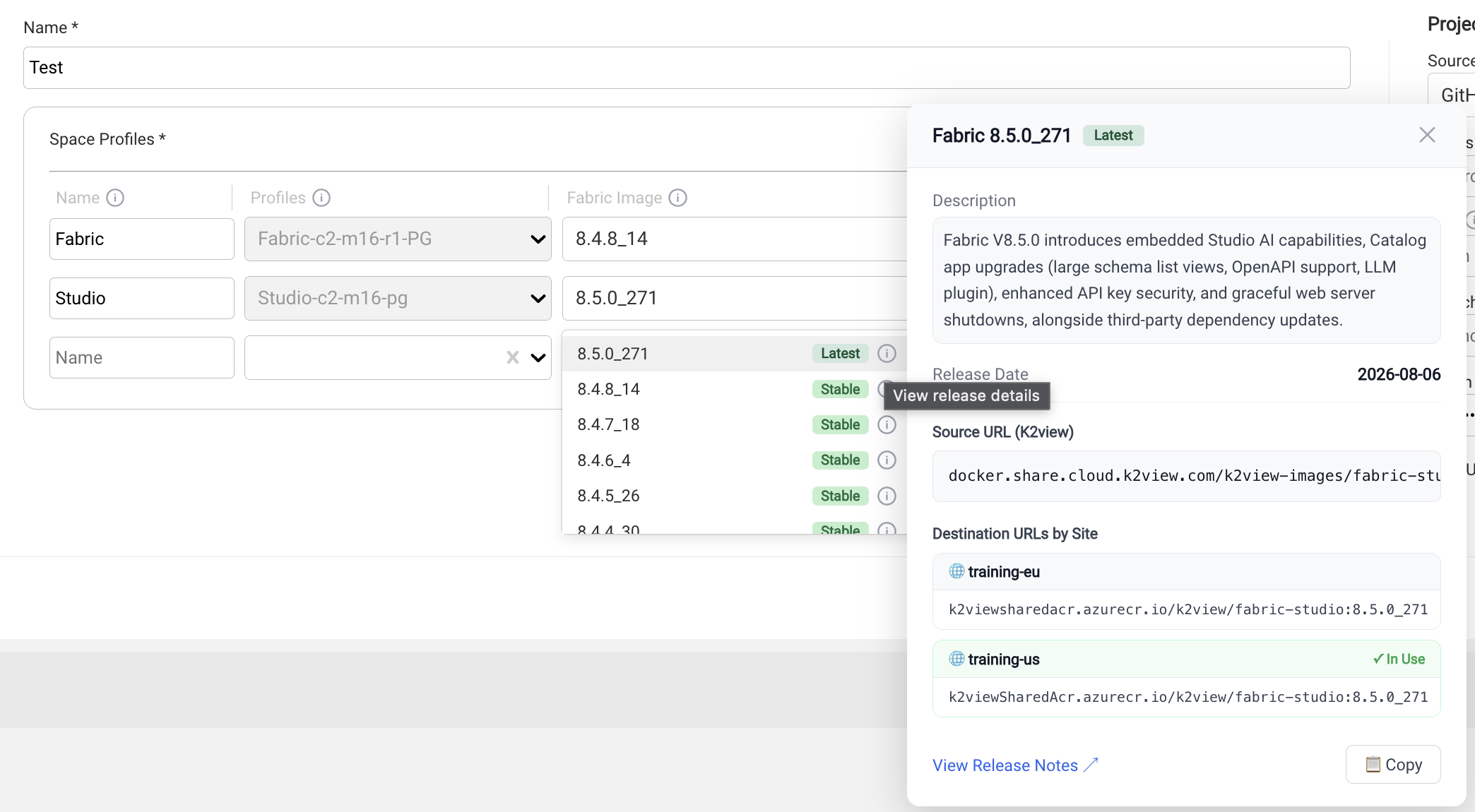
Additional information about an available Fabric Image can be viewed from the Fabric Image selection.
Release information can include:
- version and lifecycle status,
- release date and description,
- release notes,
- K2view source image location,
- and the destination image location configured for the Site.
For K2cloud Self-Hosted environments, the destination location is particularly important because the required images must be available in the customer container registry before the version can be deployed.
Existing Spaces
Selecting a newer Fabric Image for a Space Profile does not immediately upgrade existing Spaces.
Eligible Spaces using the profile are identified as having an upgrade available. The Space Owner can then initiate the upgrade at the appropriate time.
This separates the Project Manager's selection of an available runtime version from the lifecycle operation performed on each Space.
Upgrades and Rollbacks
Detailed procedures for:
- selecting a Fabric version,
- preparing images for K2cloud Self-Hosted environments,
- upgrading a Space,
- monitoring an upgrade,
- and performing a rollback
are maintained with the Fabric installation and upgrade documentation.
See Upgrading Fabric and Studio with K2cloud.
Related Documentation
Fabric Image Versions
Overview
A Fabric Image identifies the Fabric or Studio software version associated with a Space Profile.
The Space Profile and Fabric Image serve different purposes:
- Space Profile — defines the deployment topology, resources, and runtime configuration.
- Fabric Image — defines the Fabric or Studio software version.
Keeping these separate allows the same Space Profile to be used as Fabric versions change.
Selecting a Fabric Image
The Project Manager selects the Fabric Image associated with each Space Profile from the Project configuration.
Available Fabric releases are published by K2view and appear in the Fabric Image selection for the profile.
Fabric versions are identified using values such as:
8.4.8_14
8.5.0_271
Viewing Release Information
Additional information about an available Fabric Image can be viewed from the Fabric Image selection.
Release information can include:
- version and lifecycle status,
- release date and description,
- release notes,
- K2view source image location,
- and the destination image location configured for the Site.
For K2cloud Self-Hosted environments, the destination location is particularly important because the required images must be available in the customer container registry before the version can be deployed.
Existing Spaces
Selecting a newer Fabric Image for a Space Profile does not immediately upgrade existing Spaces.
Eligible Spaces using the profile are identified as having an upgrade available. The Space Owner can then initiate the upgrade at the appropriate time.
This separates the Project Manager's selection of an available runtime version from the lifecycle operation performed on each Space.
Upgrades and Rollbacks
Detailed procedures for:
- selecting a Fabric version,
- preparing images for K2cloud Self-Hosted environments,
- upgrading a Space,
- monitoring an upgrade,
- and performing a rollback
are maintained with the Fabric installation and upgrade documentation.
See Upgrading Fabric and Studio with K2cloud.
Related Documentation
