


Versionless Space Profiles
Overview
K2cloud Space Profiles are independent from the Fabric runtime version.
A Space Profile defines the deployment topology and runtime characteristics of a Space, while the Fabric Image independently defines the Fabric or Studio version deployed within that topology.
The term versionless Space Profile describes this separation.
Space Profile → Deployment topology and runtime characteristics

Fabric Image  → Fabric or Studio version
This allows the same Space Profile to continue to be used as Fabric versions change.
Why Profiles Are Versionless
A Space Profile can define characteristics such as:
- CPU and memory resources,
- Fabric replica count,
- supporting services,
- persistence configuration,
- and other deployment settings.
These characteristics do not inherently change simply because a new Fabric release becomes available.
By managing the Fabric Image separately, K2cloud can associate a newer Fabric version with an existing Space Profile without requiring another profile to represent the new software version.
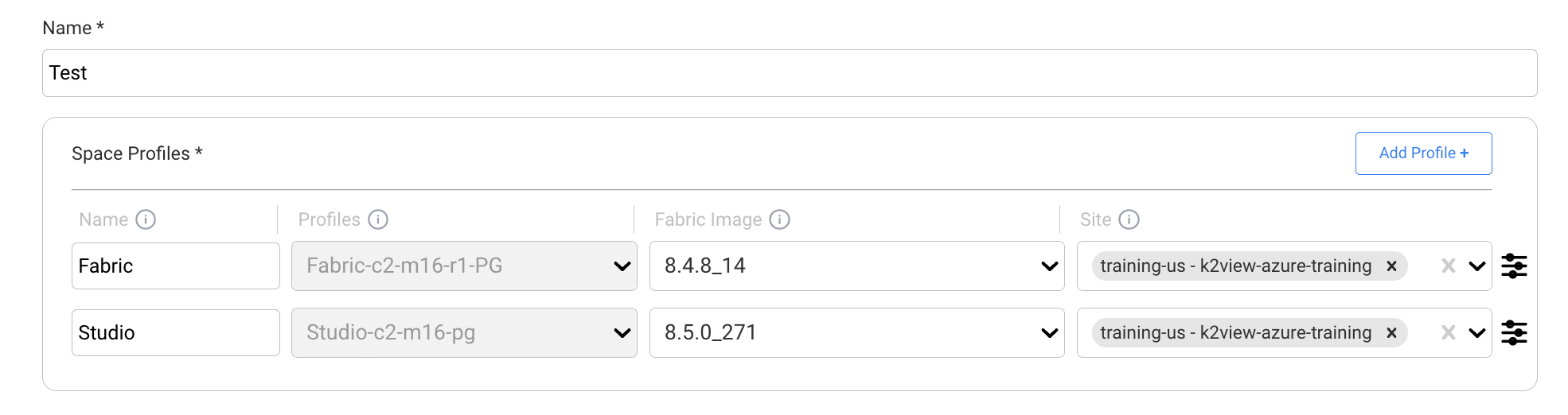
Profile Selection and Naming
K2view provides standardized Space Profiles for Studio and Fabric environments.
Profile names identify important deployment characteristics such as CPU, memory, replica count, and persistence configuration.
For example:
Studio-c2-m16-pg
Fabric-c4-m32-r3-noSdB
The authoritative Space Profile documentation provides:
- the profile naming convention,
- definitions of the profile-name components,
- available Studio and Fabric profiles,
- fixed and autoscaling replica configurations,
- persistence options,
- and guidance for selecting a profile.
See K2cloud Space Profiles Naming Convention.
Profiles and Fabric Upgrades
Because the Fabric Image is managed separately from the Space Profile, selecting a newer Fabric version does not require creating a new profile.
The Project Manager can select a newer Fabric Image for the appropriate Space Profile. Existing eligible Spaces using that profile can then be upgraded independently.
Detailed upgrade procedures are maintained with the Fabric installation and upgrade documentation.
See Upgrading Fabric and Studio with K2cloud.
Related Documentation
Versionless Space Profiles
Overview
K2cloud Space Profiles are independent from the Fabric runtime version.
A Space Profile defines the deployment topology and runtime characteristics of a Space, while the Fabric Image independently defines the Fabric or Studio version deployed within that topology.
The term versionless Space Profile describes this separation.
Space Profile → Deployment topology and runtime characteristics

Fabric Image  → Fabric or Studio version
This allows the same Space Profile to continue to be used as Fabric versions change.
Why Profiles Are Versionless
A Space Profile can define characteristics such as:
- CPU and memory resources,
- Fabric replica count,
- supporting services,
- persistence configuration,
- and other deployment settings.
These characteristics do not inherently change simply because a new Fabric release becomes available.
By managing the Fabric Image separately, K2cloud can associate a newer Fabric version with an existing Space Profile without requiring another profile to represent the new software version.
Profile Selection and Naming
K2view provides standardized Space Profiles for Studio and Fabric environments.
Profile names identify important deployment characteristics such as CPU, memory, replica count, and persistence configuration.
For example:
Studio-c2-m16-pg
Fabric-c4-m32-r3-noSdB
The authoritative Space Profile documentation provides:
- the profile naming convention,
- definitions of the profile-name components,
- available Studio and Fabric profiles,
- fixed and autoscaling replica configurations,
- persistence options,
- and guidance for selecting a profile.
See K2cloud Space Profiles Naming Convention.
Profiles and Fabric Upgrades
Because the Fabric Image is managed separately from the Space Profile, selecting a newer Fabric version does not require creating a new profile.
The Project Manager can select a newer Fabric Image for the appropriate Space Profile. Existing eligible Spaces using that profile can then be upgraded independently.
Detailed upgrade procedures are maintained with the Fabric installation and upgrade documentation.
See Upgrading Fabric and Studio with K2cloud.
Related Documentation
