


Space Profile General Settings
Overview
The General settings of a Space Profile control deployment characteristics that apply to Spaces created using the profile.
These settings include:
- environment designation,
- Space limits,
- and ingress behavior.
General Settings are configured from the Space Profile Advanced Settings dialog.
Open General Settings
To open the General Settings:
- Open the K2cloud Orchestrator.
- Open Projects.
- Locate the Project and Space Profile.
- Open the Space Profile Advanced Settings.
- Select the General tab.
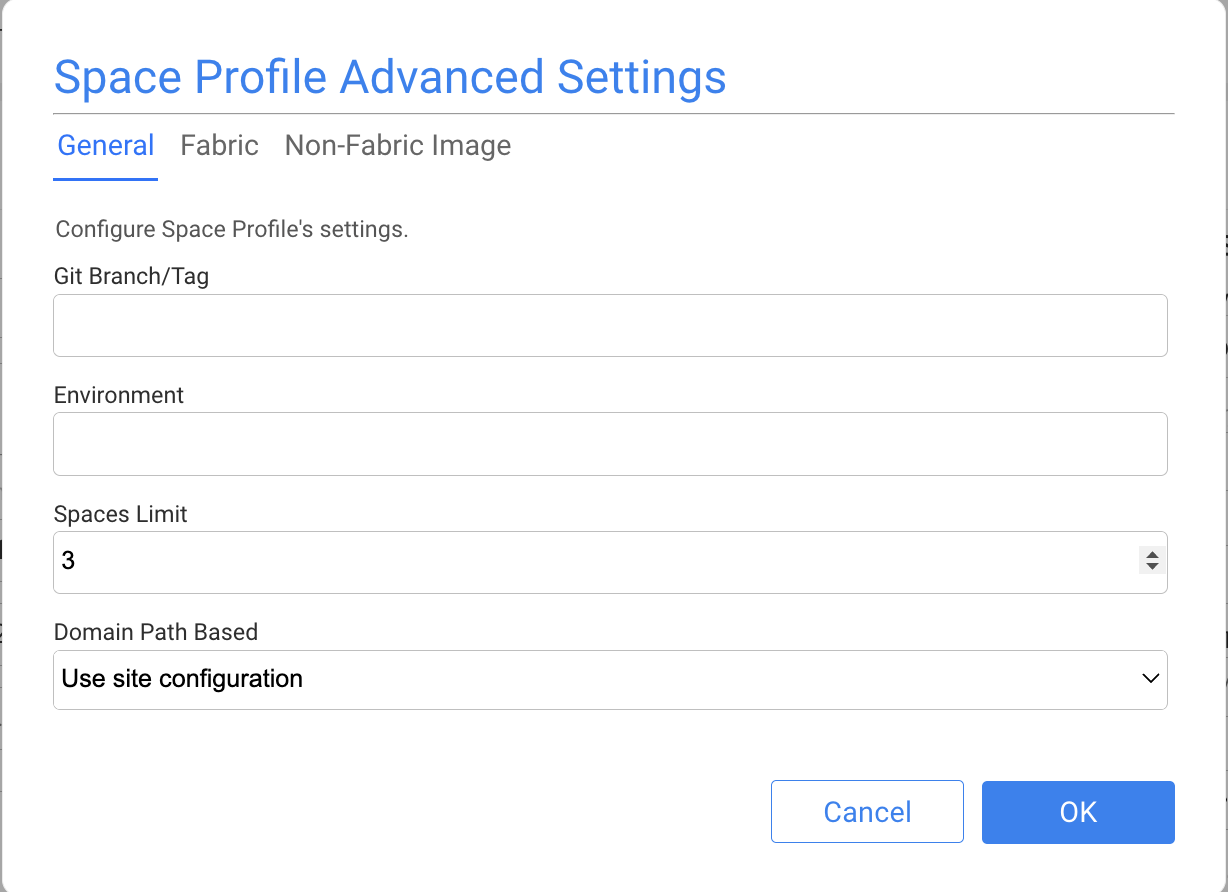
Environment Designation
The Environment setting identifies the operational purpose associated with the profile.
Typical environment designations include:
dev
qa
staging
prod
The environment designation provides context for Spaces created using the profile and should reflect the intended use of those Spaces.
Space Limits
The Space Limit setting controls how many Spaces can be created using the profile.
A limit can be used to control the number of environments created from a particular deployment profile and help manage the infrastructure resources associated with those Spaces.
Ingress Mode
The Ingress Mode determines how ingress behavior is selected for Spaces created using the profile.
The available modes are:
- Use Site Configuration
- Context Path
- Subdomain
Use Site Configuration
Use Site Configuration causes the Space to inherit the ingress behavior configured for the Site.
This centralizes ingress policy at the Site level and avoids defining the same routing behavior separately in each Space Profile.
Context Path
Context Path routes multiple Spaces through a common domain and differentiates the Spaces through the URL path.
Context-path routing is the preferred approach for new K2cloud deployments where applicable because it reduces the proliferation of Space-specific hostnames and simplifies DNS and TLS certificate management.
Subdomain
Subdomain assigns each Space a Space-specific hostname.
This mode may be appropriate for existing deployments or environments that require separate Space hostnames, but typically introduces additional DNS and certificate considerations as Spaces are added.
Site and Profile Ingress Configuration
Ingress behavior can be established centrally through the Site or overridden by the Space Profile when a different routing model is required.
Where a consistent ingress model is used across a Site, Use Site Configuration keeps that policy centralized.
For more information about Sites and ingress configuration, see Sites.
Save Changes
After modifying the General Settings:
- Review the configuration.
- Save the Space Profile.
- Confirm that the changes are appropriate for Spaces that use the profile.
Changes to a Space Profile should be reviewed carefully when the profile is already being used by existing Spaces.
Related Documentation
Space Profile General Settings
Overview
The General settings of a Space Profile control deployment characteristics that apply to Spaces created using the profile.
These settings include:
- environment designation,
- Space limits,
- and ingress behavior.
General Settings are configured from the Space Profile Advanced Settings dialog.
Open General Settings
To open the General Settings:
- Open the K2cloud Orchestrator.
- Open Projects.
- Locate the Project and Space Profile.
- Open the Space Profile Advanced Settings.
- Select the General tab.
Environment Designation
The Environment setting identifies the operational purpose associated with the profile.
Typical environment designations include:
dev
qa
staging
prod
The environment designation provides context for Spaces created using the profile and should reflect the intended use of those Spaces.
Space Limits
The Space Limit setting controls how many Spaces can be created using the profile.
A limit can be used to control the number of environments created from a particular deployment profile and help manage the infrastructure resources associated with those Spaces.
Ingress Mode
The Ingress Mode determines how ingress behavior is selected for Spaces created using the profile.
The available modes are:
- Use Site Configuration
- Context Path
- Subdomain
Use Site Configuration
Use Site Configuration causes the Space to inherit the ingress behavior configured for the Site.
This centralizes ingress policy at the Site level and avoids defining the same routing behavior separately in each Space Profile.
Context Path
Context Path routes multiple Spaces through a common domain and differentiates the Spaces through the URL path.
Context-path routing is the preferred approach for new K2cloud deployments where applicable because it reduces the proliferation of Space-specific hostnames and simplifies DNS and TLS certificate management.
Subdomain
Subdomain assigns each Space a Space-specific hostname.
This mode may be appropriate for existing deployments or environments that require separate Space hostnames, but typically introduces additional DNS and certificate considerations as Spaces are added.
Site and Profile Ingress Configuration
Ingress behavior can be established centrally through the Site or overridden by the Space Profile when a different routing model is required.
Where a consistent ingress model is used across a Site, Use Site Configuration keeps that policy centralized.
For more information about Sites and ingress configuration, see Sites.
Save Changes
After modifying the General Settings:
- Review the configuration.
- Save the Space Profile.
- Confirm that the changes are appropriate for Spaces that use the profile.
Changes to a Space Profile should be reviewed carefully when the profile is already being used by existing Spaces.
Related Documentation
