


Affinity and Worker Configuration for Task Execution
Starting with TDM 9.5, TDM supports configuring affinity and/or number of workers at both the TDM environment level and the task level. These settings provide greater control over resource allocation and workload distribution.
This feature applies to:
- Entity-based tasks
- Table-level tasks
Affinity Configuration
Affinity refers to Fabric assigning a job or a batch process to a specific handling node within a Fabric cluster. This is particularly handy when specific nodes are reserved for specific tasks or need to be dedicated to time-consuming or heavy processing executions.
Click here for more information about the batch affinity.
Task execution affinity can be specified using either a DC name or a cluster Logical ID.
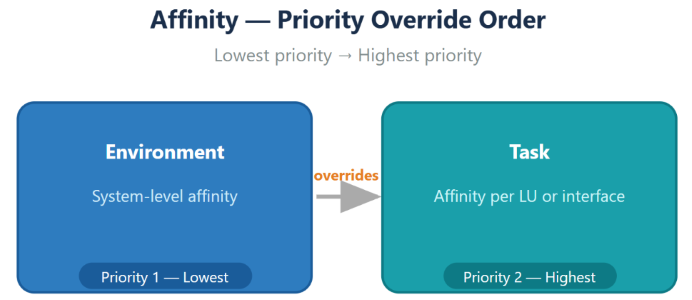
An affinity can be defined either on the Environment system or on the Task level.
The following diagram illustrates the priority order used by task execution to determine affinity:
Task Level Affinity Configuration
An affinity can be set on both task types - entity-level and table-level. The affinity can be set either on the Source or the Target component in the task. The table below describes which affinity is taken - source or target - for each task type and processed data:
| Processed Data | Task Type | Source Affinity | Target Affinity | Task Exec. Affinity |
|---|---|---|---|---|
| Entities, Tables, Entities & Tables | All types | Undefined | Undefined | No affinity is set |
| Entities, Tables, Entities & Tables | Extract | Defined | N/A | Runs on source affinity |
| Entities | Load / Delete / Reserve only | N/A | Defined | Runs on target affinity |
| Entities | Extract & Load | Defined | Defined | The batch process runs on the target env affinity. The get LUI runs on the source env affinity (remote get) |
| Entities | Extract & Load | Undefined | Defined | No affinity is set on the batch process. The get LUI runs on the source affinity (remote get) |
| Entities | Extract & Load | Undefined | Undefined | No affinity is set on the batch process or the get LUI |
| Tables | Extract & Load | N/A | Defined | The extract + load batch process runs on the target env affinity |
| Tables | Extract & Load | Undefined | Undefined | No affinity is set |
| Tables | Extract & Load & Delete | N/A | Defined | The extract + load and the delete batch processes run on the Task target affinity |
| Tables | Extract & Load / Extract & Load & Delete | N/A | Undefined | No affinity is set |
Workers Configuration
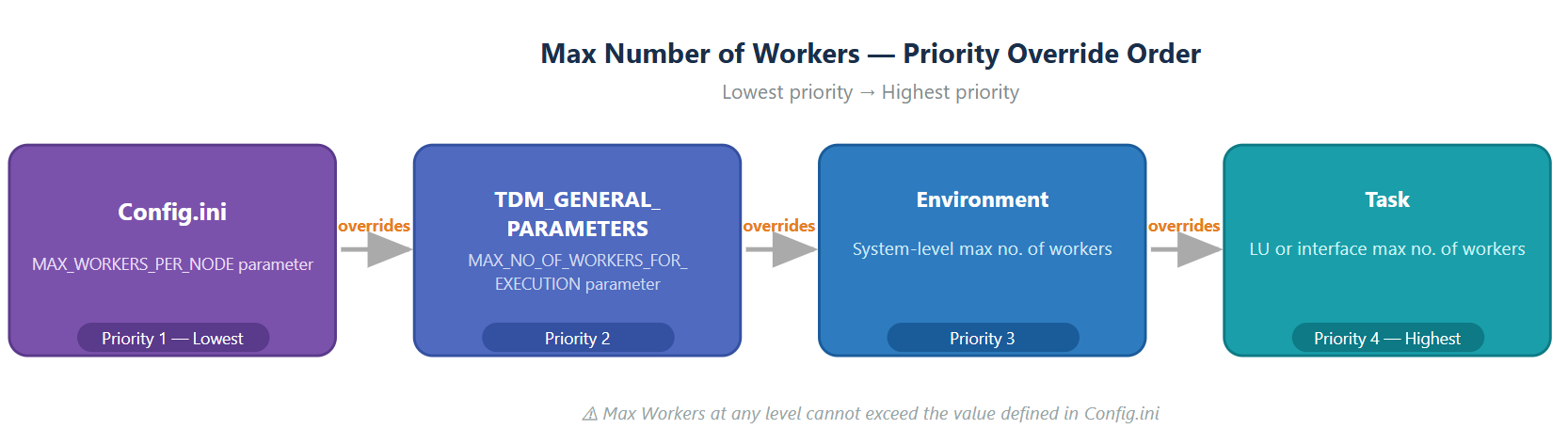
The maximum number of workers allocated per Fabric node for batch process execution is controlled by the Fabric config.ini file parameter: MAX_WORKERS_PER_NODE. This value also serves as the default number of workers when running a batch process.
Starting with TDM 9.5, you can define a different default number of workers for TDM task execution. The effective value is determined based on the following configuration levels (listed from lowest to highest priority):
- TDM DB – General Parameters
A new parameter,
MAX_NO_OF_WORKERS_FOR_EXECUTION, has been added to theTDM_GENERAL_PARAMETERStable.- When set to -1, the parameter is ignored.
- When set to a value greater than 0, it is used as the default number of workers for TDM task executions.
- Environment - You can configure the maximum number of workers per system in the Environment.
- Task - You can define the maximum number of workers at the task level, either on the Source component or the Target component. This setting is supported for both:
The following diagram illustrates the priority order used to determine the effective maximum number of workers during task execution:
The table below shows whether the task execution uses the source or target value for the number of workers, depending on the task type and the data being processed:


Affinity and Worker Configuration for Task Execution
Starting with TDM 9.5, TDM supports configuring affinity and/or number of workers at both the TDM environment level and the task level. These settings provide greater control over resource allocation and workload distribution.
This feature applies to:
- Entity-based tasks
- Table-level tasks
Affinity Configuration
Affinity refers to Fabric assigning a job or a batch process to a specific handling node within a Fabric cluster. This is particularly handy when specific nodes are reserved for specific tasks or need to be dedicated to time-consuming or heavy processing executions.
Click here for more information about the batch affinity.
Task execution affinity can be specified using either a DC name or a cluster Logical ID.
An affinity can be defined either on the Environment system or on the Task level.
The following diagram illustrates the priority order used by task execution to determine affinity:
Task Level Affinity Configuration
An affinity can be set on both task types - entity-level and table-level. The affinity can be set either on the Source or the Target component in the task. The table below describes which affinity is taken - source or target - for each task type and processed data:
| Processed Data | Task Type | Source Affinity | Target Affinity | Task Exec. Affinity |
|---|---|---|---|---|
| Entities, Tables, Entities & Tables | All types | Undefined | Undefined | No affinity is set |
| Entities, Tables, Entities & Tables | Extract | Defined | N/A | Runs on source affinity |
| Entities | Load / Delete / Reserve only | N/A | Defined | Runs on target affinity |
| Entities | Extract & Load | Defined | Defined | The batch process runs on the target env affinity. The get LUI runs on the source env affinity (remote get) |
| Entities | Extract & Load | Undefined | Defined | No affinity is set on the batch process. The get LUI runs on the source affinity (remote get) |
| Entities | Extract & Load | Undefined | Undefined | No affinity is set on the batch process or the get LUI |
| Tables | Extract & Load | N/A | Defined | The extract + load batch process runs on the target env affinity |
| Tables | Extract & Load | Undefined | Undefined | No affinity is set |
| Tables | Extract & Load & Delete | N/A | Defined | The extract + load and the delete batch processes run on the Task target affinity |
| Tables | Extract & Load / Extract & Load & Delete | N/A | Undefined | No affinity is set |
Workers Configuration
The maximum number of workers allocated per Fabric node for batch process execution is controlled by the Fabric config.ini file parameter: MAX_WORKERS_PER_NODE. This value also serves as the default number of workers when running a batch process.
Starting with TDM 9.5, you can define a different default number of workers for TDM task execution. The effective value is determined based on the following configuration levels (listed from lowest to highest priority):
- TDM DB – General Parameters
A new parameter,
MAX_NO_OF_WORKERS_FOR_EXECUTION, has been added to theTDM_GENERAL_PARAMETERStable.- When set to -1, the parameter is ignored.
- When set to a value greater than 0, it is used as the default number of workers for TDM task executions.
- Environment - You can configure the maximum number of workers per system in the Environment.
- Task - You can define the maximum number of workers at the task level, either on the Source component or the Target component. This setting is supported for both:
The following diagram illustrates the priority order used to determine the effective maximum number of workers during task execution:
The table below shows whether the task execution uses the source or target value for the number of workers, depending on the task type and the data being processed:
