


TDM App Overview
The TDM App is a web-based application that helps users to easily control and manage test data. It has 2 main functions:
- TDM administrative activities - this function defines TDM Business Entities, system, environments, permissions and reports.
- TDM copy activities - this function creates and executes TDM tasks that provide a selected subset of entities or tables to a selected environment.
TDM settings and tasks are saved in the TDM PostgreSQL DB. Each TDM activity, created by a user via the TDM App, updates the TDM DB.
The TDM App uses APIs to connect to the TDM DB in order to retrieve and update TDM settings and tasks.
TDM App - Login
The TDM App application is pre-integrated with the Fabric Web Framework. The user logs into the Fabric Web Framework and Fabric authenticates the user.
Fabric works with several authentication providers. Each authenticator is responsible for authenticating a user, and provides a user-ID and the user's roles. The following are authentication providers, supported by Fabric:
- Fabric - for console, WS and web access, using its repository. This is Fabric's default authentication method.
- LDAP server - for console, WS and web access. Done via LDAP integration.
- ADLDAP (Active Directory) server - for console, WS and web access. Done via LDAP integration.
- SAML server - for web and WS access. Done via SAML IDP integration.
Click for more information about Fabric's User Identification and Access Management.
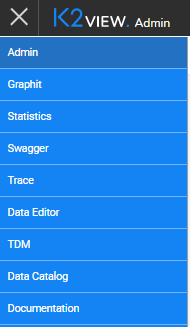
To log into the TDM App, click the Web Framework app menu  , and select the TDM option.
TDM App - Home Page
After logging in, the TDM App opens on the Manage Your Tasks home page, which displays the available TDM tasks:
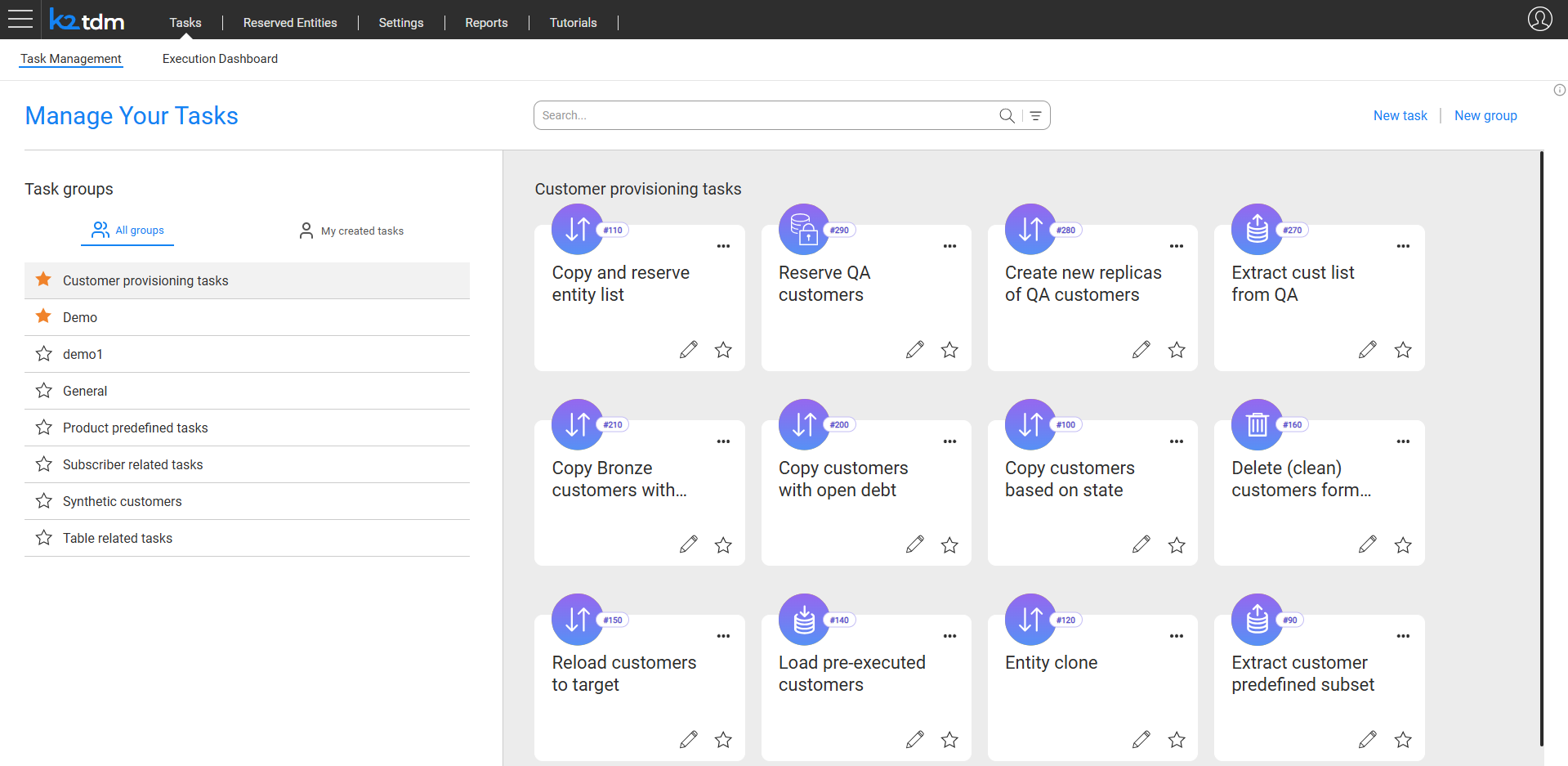
The home page has the following areas:
- Task Groups panel (left) – lists the task groups. Click a group to display its tasks in the main area. The panel has two tabs:
- All groups – displays all task groups available to the user.
- My created tasks – displays only tasks created by the logged-in user.
- Task cards area (main) – displays the tasks of the selected group as cards. Each card shows the task name, task ID, and task type icon. Click a task card to open the task.
- Search bar – search for a task by name across all groups.
- New task and New group buttons (top right) – available to users with task creation permissions.
TDM App Navigation
TDM Navigation Tabs
The following tabs are displayed at the top of the TDM App:

- Tasks – opens the home page. Contains two sub-tabs:
- Task Management – displays the Manage Your Tasks home page for creating and managing tasks.
- Execution Dashboard – displays the execution status of TDM tasks.
- Reserved Entities – displays the list of entities currently reserved in TDM environments.
- Settings – contains TDM administrative settings. Available to Admin and Owner users.
- Reports – displays TDM usage reports. Available to Admin and Environment Owner users.
The Settings tab contains the following sub-tabs:

Masking-Only Mode
A Masking-only mode has been added to the TDM App in TDM 9.3. When no Business Entities (BEs) are implemented, the TDM App now automatically operates in Masking-only mode, which supports table-level tasks exclusively.
To enable the full functionality with BE-based tasks:
Deploy at least one Logical Unit (LU) to Fabric to activate the Business Entities tab.
Define at least one Business Entity (BE) to enable the creation of BE-based tasks.
TDM App Navigation - Back Button
The TDM App uses a Back button to navigate between screens. Click the Back button to return to the previous screen.
TDM Delete
A Delete activity generally changes the status of a selected object to Inactive and does not delete the object from the TDM DB. The object remains in the TDM DB and its history can be displayed in the TDM App.
Inactive objects cannot be repaired.

TDM App Overview
The TDM App is a web-based application that helps users to easily control and manage test data. It has 2 main functions:
- TDM administrative activities - this function defines TDM Business Entities, system, environments, permissions and reports.
- TDM copy activities - this function creates and executes TDM tasks that provide a selected subset of entities or tables to a selected environment.
TDM settings and tasks are saved in the TDM PostgreSQL DB. Each TDM activity, created by a user via the TDM App, updates the TDM DB.
The TDM App uses APIs to connect to the TDM DB in order to retrieve and update TDM settings and tasks.
TDM App - Login
The TDM App application is pre-integrated with the Fabric Web Framework. The user logs into the Fabric Web Framework and Fabric authenticates the user.
Fabric works with several authentication providers. Each authenticator is responsible for authenticating a user, and provides a user-ID and the user's roles. The following are authentication providers, supported by Fabric:
- Fabric - for console, WS and web access, using its repository. This is Fabric's default authentication method.
- LDAP server - for console, WS and web access. Done via LDAP integration.
- ADLDAP (Active Directory) server - for console, WS and web access. Done via LDAP integration.
- SAML server - for web and WS access. Done via SAML IDP integration.
Click for more information about Fabric's User Identification and Access Management.
To log into the TDM App, click the Web Framework app menu , and select the TDM option.
TDM App - Home Page
After logging in, the TDM App opens on the Manage Your Tasks home page, which displays the available TDM tasks:
The home page has the following areas:
- Task Groups panel (left) – lists the task groups. Click a group to display its tasks in the main area. The panel has two tabs:
- All groups – displays all task groups available to the user.
- My created tasks – displays only tasks created by the logged-in user.
- Task cards area (main) – displays the tasks of the selected group as cards. Each card shows the task name, task ID, and task type icon. Click a task card to open the task.
- Search bar – search for a task by name across all groups.
- New task and New group buttons (top right) – available to users with task creation permissions.
TDM App Navigation
TDM Navigation Tabs
The following tabs are displayed at the top of the TDM App:
- Tasks – opens the home page. Contains two sub-tabs:
- Task Management – displays the Manage Your Tasks home page for creating and managing tasks.
- Execution Dashboard – displays the execution status of TDM tasks.
- Reserved Entities – displays the list of entities currently reserved in TDM environments.
- Settings – contains TDM administrative settings. Available to Admin and Owner users.
- Reports – displays TDM usage reports. Available to Admin and Environment Owner users.
The Settings tab contains the following sub-tabs:
Masking-Only Mode
A Masking-only mode has been added to the TDM App in TDM 9.3. When no Business Entities (BEs) are implemented, the TDM App now automatically operates in Masking-only mode, which supports table-level tasks exclusively.
To enable the full functionality with BE-based tasks:
Deploy at least one Logical Unit (LU) to Fabric to activate the Business Entities tab.
Define at least one Business Entity (BE) to enable the creation of BE-based tasks.
TDM App Navigation - Back Button
The TDM App uses a Back button to navigate between screens. Click the Back button to return to the previous screen.
TDM Delete
A Delete activity generally changes the status of a selected object to Inactive and does not delete the object from the TDM DB. The object remains in the TDM DB and its history can be displayed in the TDM App.
Inactive objects cannot be repaired.
