


Classification & Profiling Plugins
The following article describes basic classification plugins included in the Catalog solution:
- Data Regex Classifier - classify the source fields based on their data (field value).
- Metadata Regex Classifier - classify the source fields based on their metadata (field name).
- Classification PII Marker - create the
PII=trueproperty on Catalog fields, based on their classification. - Bulk Dimension Loader - load properties onto schemas, datasets, classes and fields from an input file. This plugin is available starting from Fabric V8.5.1.
Data Regex Classifier
The purpose of the Data Regex Classifier plugin is to classify the source fields based on their data - field value. This classification helps to identify which Catalog entities store sensitive information and should therefore be masked.
This plugin runs on a data snapshot that is extracted from the source, and it executes the regular expressions defined in a built-in data_profiling MTable.
If a regular expression (known as regex) matches the field's data, a Classification property is added to the field with a value corresponding to the matching regex (e.g., EMAIL). If a match is found for more than one expression, the property is created with the Classification that has the highest calculated score. Note that starting from Fabric V8.5, the rules can be disabled in order to be ignored by the plugin.
To update the data profiling rules, go to the Catalog Settings > Classifier Regex tab.
Example:
The following regular expression \b(?:\d[ -]*?){13,16}\b is executed on the field's values:

When the expression matches a field's value, the probability that this field holds a credit card number is 0.8. Thus, in case of a match, the score is 0.8 and when there is no match, the score is 0. The expression is executed on all values in the given column in the data sample and the average score is calculated. Then, the calculated average score is compared with the plugin's threshold as explained here. If the calculated average score is above the threshold, the Classification = CREDIT_CARD property is added to the field.
Metadata Regex Classifier
The purpose of the Metadata Regex Classifier plugin is to classify the source fields based on their metadata - field name.
The matching rules are defined using regular expressions in a built-in metadata_profiling MTable.
If a regular expression (known as regex) matches the field's name, a Classification property is added to the field with a value corresponding to the matching regex (e.g., SOCIAL_SECURITY_NUMBER). If a match is found for more than one expression, the property is created with the Classification that has the highest score. Note that starting from Fabric V8.5, the rules can be disabled in order to be ignored by the plugin.
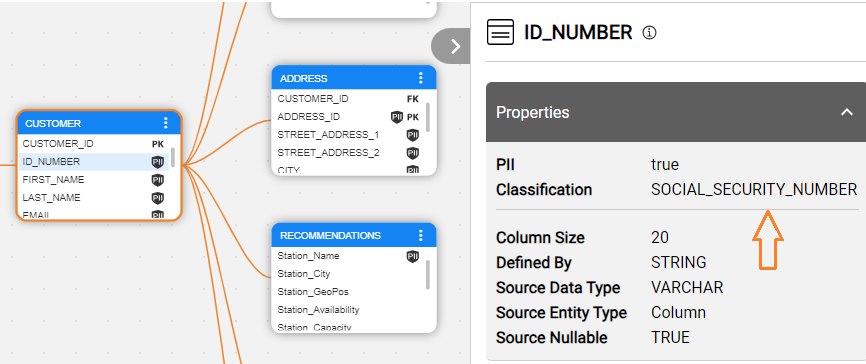
To update the metadata profiling rules, go to the Catalog Settings > Classifier Regex tab.
Field Exclusion List
Fields can be excluded from the Metadata Regex Classifier plugin's logic by either their name or type. This can be useful when, for example, you need to exclude all fields with a certain name pattern from the classification process.
The exclusion list can be defined using the Discovery Pipeline Settings screen as follows:
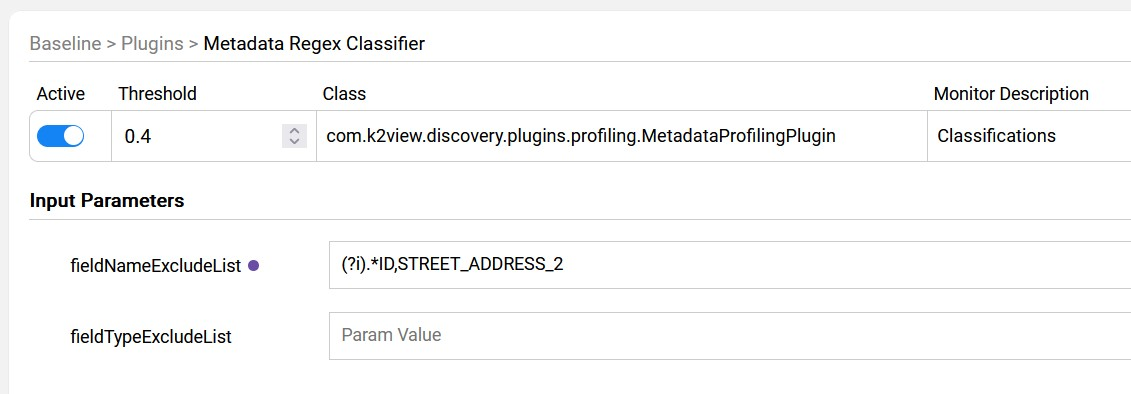
Click here to learn how to create the override rules using the Discovery Pipeline Settings screen.
Classification PII Marker
The purpose of the Classification PII Marker plugin is to iterate over all the fields that have the Classification property (by either one of the profiling plugins) and to add the PII property.
The rules for determining whether a classification type is considered PII are defined in a built-in pii_profiling MTable.
To update the Classification's PII indicator, go to the Catalog Settings > PII & Masking tab.
Field Exclusion List
Fields can be excluded from the Classification PII Marker plugin's logic by either their name or type. This can be useful when, for example, you need to exclude all fields with a certain name or a name pattern from the PII marking process.
The exclusion list can be defined using the Discovery Pipeline Settings screen as follows:

Click here to learn how to create the override rules using the Discovery Pipeline Settings screen.
Bulk Dimension Loader
The purpose of the Bulk Dimension Loader plugin is to load properties (e.g. description or classification) onto Catalog nodes — schemas, datasets, classes, or fields — in bulk, from an input CSV file.
This plugin is available starting from Fabric V8.5.1.
The plugin's input parameter is:
inputFile- the input file name.- The file should be placed in Fabric Studio under:
/SharedObjects/Interfaces/Discovery/Mtable. - If the
inputFileis empty, the plugin searches for a file using the default name:BulkDimensionLoader_<interface_name>.csv.
- The file should be placed in Fabric Studio under:
The expected input file structure is as follows:
- The first 4 columns -
schema,dataset,classandfield- identify the node on which the properties should be created. - The remaining columns hold the property values to load, with each column header being the name of the property to create (e.g.
description). - The node level on which the properties are created depends on which of the first 4 columns are populated:
- When only
schemais populated, the properties are created on the schema. - When
schema,datasetandclassare populated, the properties are created on the class. - When all 4 columns -
schema,dataset,classandfield- are populated, the properties are created on the field.
- When only
Classification & Profiling Plugins
The following article describes basic classification plugins included in the Catalog solution:
- Data Regex Classifier - classify the source fields based on their data (field value).
- Metadata Regex Classifier - classify the source fields based on their metadata (field name).
- Classification PII Marker - create the
PII=trueproperty on Catalog fields, based on their classification. - Bulk Dimension Loader - load properties onto schemas, datasets, classes and fields from an input file. This plugin is available starting from Fabric V8.5.1.
Data Regex Classifier
The purpose of the Data Regex Classifier plugin is to classify the source fields based on their data - field value. This classification helps to identify which Catalog entities store sensitive information and should therefore be masked.
This plugin runs on a data snapshot that is extracted from the source, and it executes the regular expressions defined in a built-in data_profiling MTable.
If a regular expression (known as regex) matches the field's data, a Classification property is added to the field with a value corresponding to the matching regex (e.g., EMAIL). If a match is found for more than one expression, the property is created with the Classification that has the highest calculated score. Note that starting from Fabric V8.5, the rules can be disabled in order to be ignored by the plugin.
To update the data profiling rules, go to the Catalog Settings > Classifier Regex tab.
Example:
The following regular expression \b(?:\d[ -]*?){13,16}\b is executed on the field's values:
When the expression matches a field's value, the probability that this field holds a credit card number is 0.8. Thus, in case of a match, the score is 0.8 and when there is no match, the score is 0. The expression is executed on all values in the given column in the data sample and the average score is calculated. Then, the calculated average score is compared with the plugin's threshold as explained here. If the calculated average score is above the threshold, the Classification = CREDIT_CARD property is added to the field.
Metadata Regex Classifier
The purpose of the Metadata Regex Classifier plugin is to classify the source fields based on their metadata - field name.
The matching rules are defined using regular expressions in a built-in metadata_profiling MTable.
If a regular expression (known as regex) matches the field's name, a Classification property is added to the field with a value corresponding to the matching regex (e.g., SOCIAL_SECURITY_NUMBER). If a match is found for more than one expression, the property is created with the Classification that has the highest score. Note that starting from Fabric V8.5, the rules can be disabled in order to be ignored by the plugin.
To update the metadata profiling rules, go to the Catalog Settings > Classifier Regex tab.
Field Exclusion List
Fields can be excluded from the Metadata Regex Classifier plugin's logic by either their name or type. This can be useful when, for example, you need to exclude all fields with a certain name pattern from the classification process.
The exclusion list can be defined using the Discovery Pipeline Settings screen as follows:
Click here to learn how to create the override rules using the Discovery Pipeline Settings screen.
Classification PII Marker
The purpose of the Classification PII Marker plugin is to iterate over all the fields that have the Classification property (by either one of the profiling plugins) and to add the PII property.
The rules for determining whether a classification type is considered PII are defined in a built-in pii_profiling MTable.
To update the Classification's PII indicator, go to the Catalog Settings > PII & Masking tab.
Field Exclusion List
Fields can be excluded from the Classification PII Marker plugin's logic by either their name or type. This can be useful when, for example, you need to exclude all fields with a certain name or a name pattern from the PII marking process.
The exclusion list can be defined using the Discovery Pipeline Settings screen as follows:
Click here to learn how to create the override rules using the Discovery Pipeline Settings screen.
Bulk Dimension Loader
The purpose of the Bulk Dimension Loader plugin is to load properties (e.g. description or classification) onto Catalog nodes — schemas, datasets, classes, or fields — in bulk, from an input CSV file.
This plugin is available starting from Fabric V8.5.1.
The plugin's input parameter is:
inputFile- the input file name.- The file should be placed in Fabric Studio under:
/SharedObjects/Interfaces/Discovery/Mtable. - If the
inputFileis empty, the plugin searches for a file using the default name:BulkDimensionLoader_<interface_name>.csv.
- The file should be placed in Fabric Studio under:
The expected input file structure is as follows:
- The first 4 columns -
schema,dataset,classandfield- identify the node on which the properties should be created. - The remaining columns hold the property values to load, with each column header being the name of the property to create (e.g.
description). - The node level on which the properties are created depends on which of the first 4 columns are populated:
- When only
schemais populated, the properties are created on the schema. - When
schema,datasetandclassare populated, the properties are created on the class. - When all 4 columns -
schema,dataset,classandfield- are populated, the properties are created on the field.
- When only
